
Quick Summary
Install ATrades in EasyParcel and allow access. ATrades can then book shipments and pay for them from your EasyParcel credit.
We'll Cover:
Steps
- Click Integration > Add Ecommerce App.
- Search for ATrades and click Install App.
- Read what ATrades is asking for (1).
- Choose whether ATrades can see full receiver details (2).
- Click Allow Access (3).
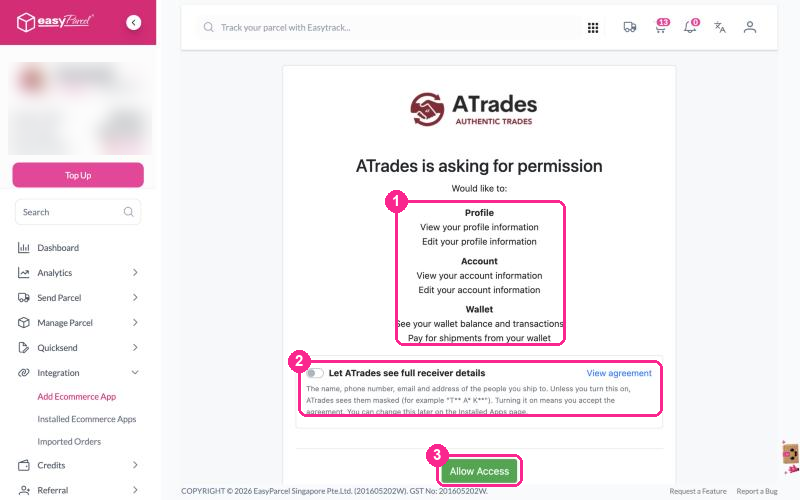
What ATrades can do?
| Area | Access |
|---|---|
| Profile | View and edit your profile information |
| Account | View and edit your account information |
| Wallet | See your credit balance and transactions, and pay for shipments from your credit |
Receiver details
- Receiver details are the name, phone number, email and address of the people you ship to.
- If you leave the switch off, ATrades sees them masked (for example T** A* K***).
- Turning it on means you accept the agreement. Click View agreement to read it first.
- You can change this later on Integration > Installed Ecommerce Apps.
Stop ATrades access
Go to Integration > Installed Ecommerce Apps, find ATrades and click Uninstall App.
What's next?
Still need help?
Our team is happy to help. ? Live Chat | ✉️ Contact Us