
Quick Summary
Add-ons are optional extras you can add to your parcel when you book. You can add parcel protection (EasyCover) and tracking notifications for your receiver, and you can set up AWB branding, EasyTrack branding and privacy masking once for all your parcels. Add-on prices appear in the Summary before you pay.
We'll Cover:
Add-ons on the booking page
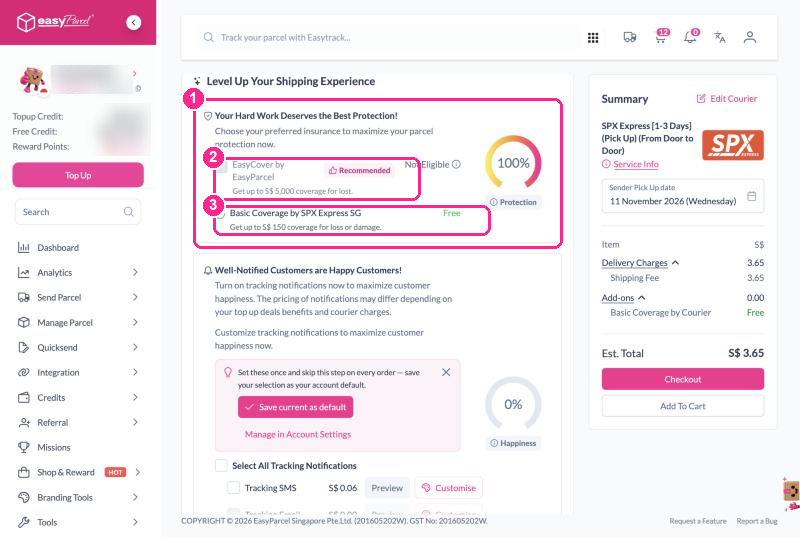
Before checkout, you will see the protection section (1), with free basic coverage from the courier (3) and optional EasyCover (2). Tracking notifications, such as Tracking SMS, are shown below it. Each option shows its price.
Add-ons you set up once
- AWB Branding – show your brand on every shipping label
- EasyTrack Branding – show your brand on the tracking page
- Privacy Masking – hide details on the shipping label
- Tracking SMS and Tracking Email – customise the messages your receivers get
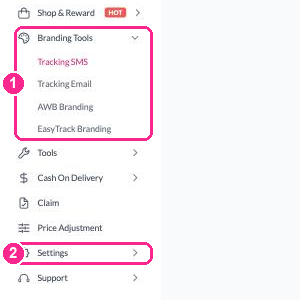
Find them under Branding Tools (1) and Settings (2) > Account Settings in the left menu. See the other articles in this folder for each add-on.
Note: Some add-ons may not be available for every courier or parcel. When one is not available, the page tells you.
Choosing add-ons on the booking page
Protection for your parcel
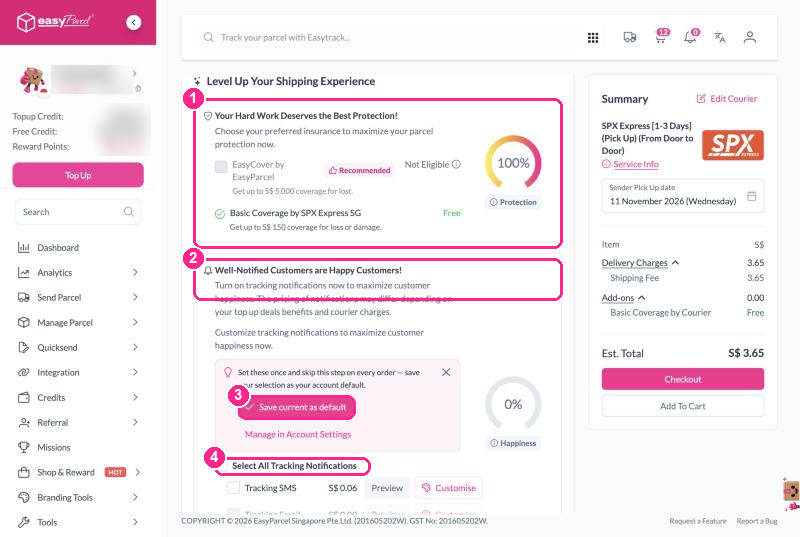
Under Your Hard Work Deserves the Best Protection! (1), choose the cover you want. Basic coverage from the courier is free. EasyCover gives higher coverage when your parcel is eligible.
Tracking notifications
Under Well-Notified Customers are Happy Customers! (2), turn on tracking messages, such as Tracking SMS, so your receiver knows where the parcel is. Tick Select All Tracking Notifications (4) to choose them all. Each option shows its price.
Save your choices as default
Click Save current as default (3) to use the same choices on every order and skip this step next time. You can change this later in Account Settings.
Note: Some protection options may show "Not Eligible" for certain parcels.
What's next?
Still need help?
Our team is happy to help. ? Live Chat | ✉️ Contact Us