
Quick Summary
Go to Credits > Coupon. Enter your coupon code in Claim New Coupon and click Claim. Your coupons are listed with how many are left and when they are valid.
We'll Cover:
- Claim a coupon
- Your coupon list
- The coupon list
- Good to know
- Related articles
Claim a coupon
Open Coupons. Enter the code in Claim New Coupon (1) and click Claim. Use Search Coupons (2) to find a coupon by name.

Your coupon list
The coupon table (3) shows each coupon's details, Balance (for example 1 Left), Validity and a View Details action.
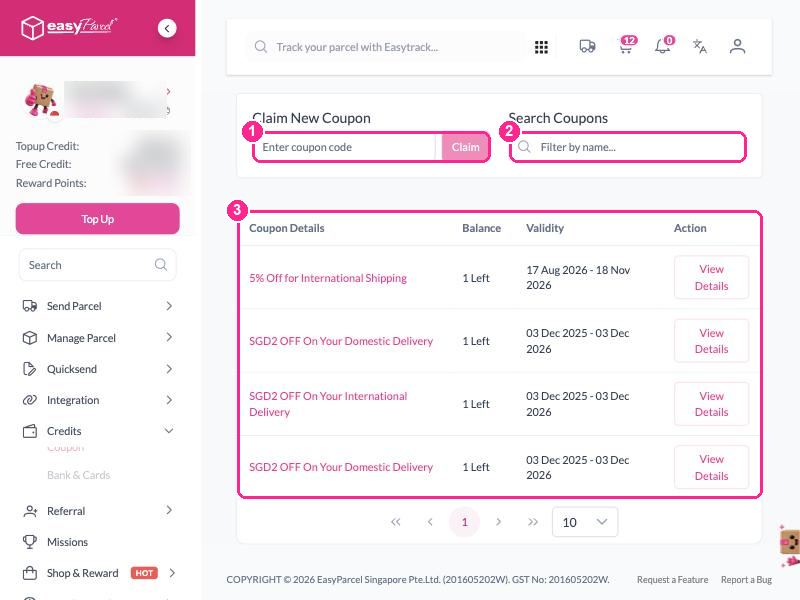
The coupon list
| Column | What it shows |
|---|---|
| Coupon Details | What the coupon gives, for example "SGD2 OFF On Your Domestic Delivery" |
| Balance | How many uses are left, for example "1 Left" |
| Validity | The dates the coupon can be used |
| Action | View Details opens the coupon terms |
Good to know
- Use Search Coupons to find a coupon by name.
- Check the Validity dates before you book. A coupon cannot be used after it ends.
Related articles
Still need help?
Our team is happy to help. ? Live Chat | ✉️ Contact Us