
Quick Summary
Click Top Up in the left menu, choose a deal, click Get It Now and pay. Your credit is added after payment.
We'll Cover:
The Top Up page
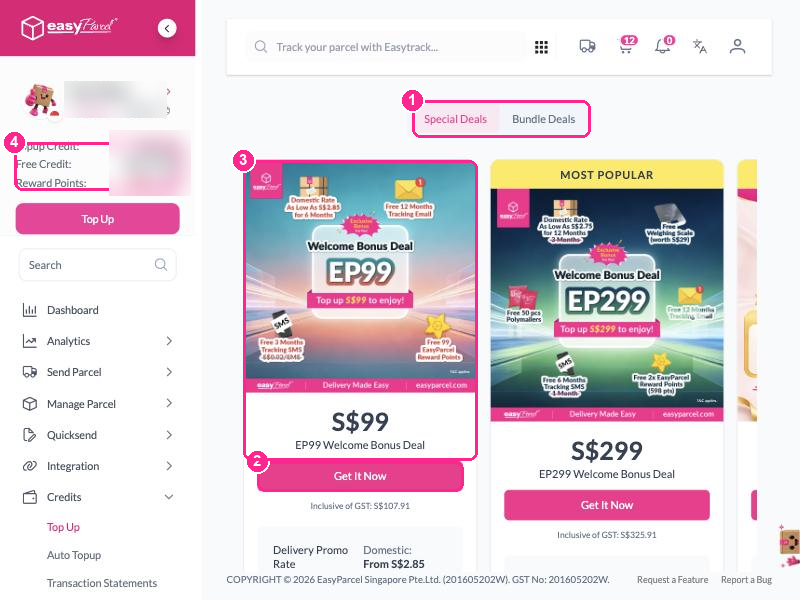
Choose between Special Deals and Bundle Deals (1). Each deal (3) shows the amount, the delivery promo rates, the free items and the reward points. Click Get It Now (2) to buy it. The total you pay, including 9% GST, is shown under each deal as Inclusive of GST.
How to top up?
- Click Top Up (4) in the left menu, or Credits > Top Up.
- Choose a deal and click Get It Now.
- Choose a payment method and pay.
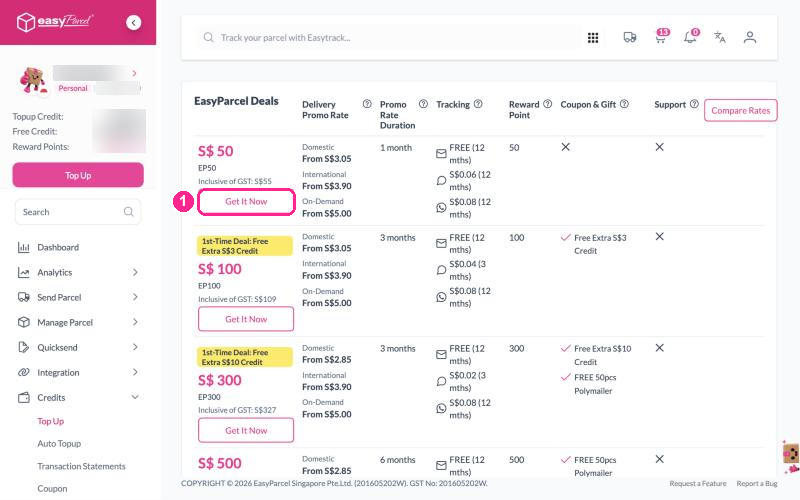
On the Top Up page, click Get It Now (1) on the deal you want.
Pay for your top-up
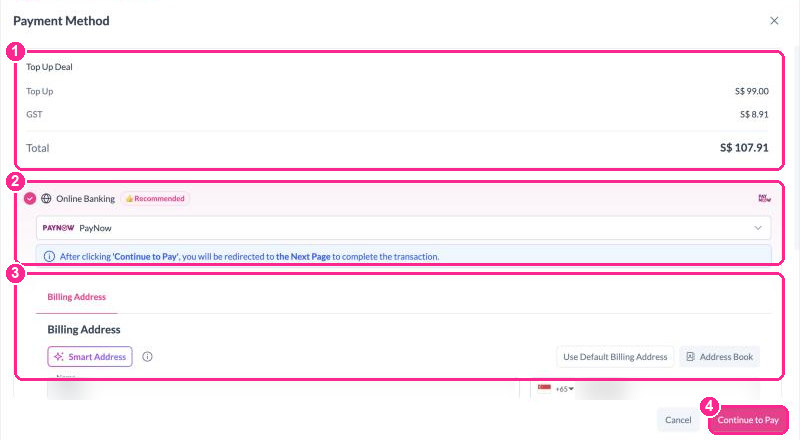
After you click Get It Now, the Payment Method window opens. Check the amount, GST and total (1). Choose Online Banking (PayNow), Credit / Debit Card or E-wallet (2). Fill in your Billing Address (3), then click Continue to Pay (4). You are taken to the payment page to finish.
What's next?
Still need help?
Our team is happy to help. ? Live Chat | ✉️ Contact Us