
Quick Summary
Top-up deals show the deal price, plus the amount you pay including GST.
We'll Cover:
- How GST is shown?
- Your invoice
- At payment
- GST examples
- Good to know
- Related articles
How GST is shown?
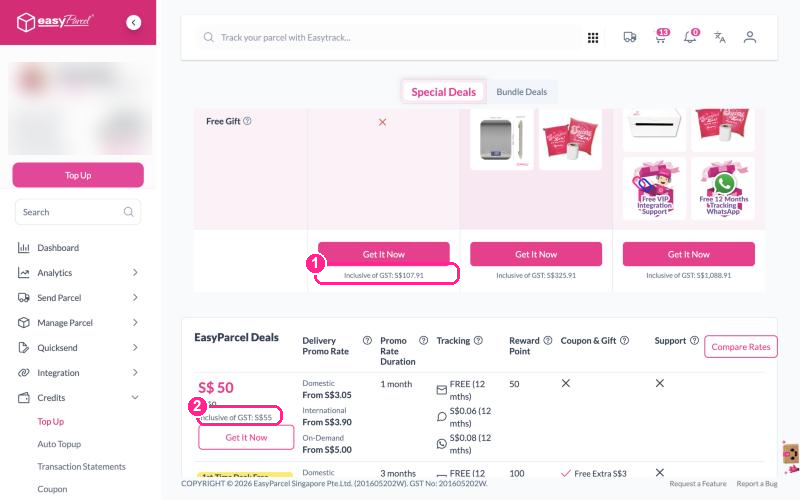
Below each deal, Inclusive of GST shows the total you pay (1). For example, the S$99 deal shows Inclusive of GST: S$107.91, and the S$50 deal shows S$55 (2).
Your invoice
Your top-up invoice shows the GST amount. See How do I download my top-up invoice?
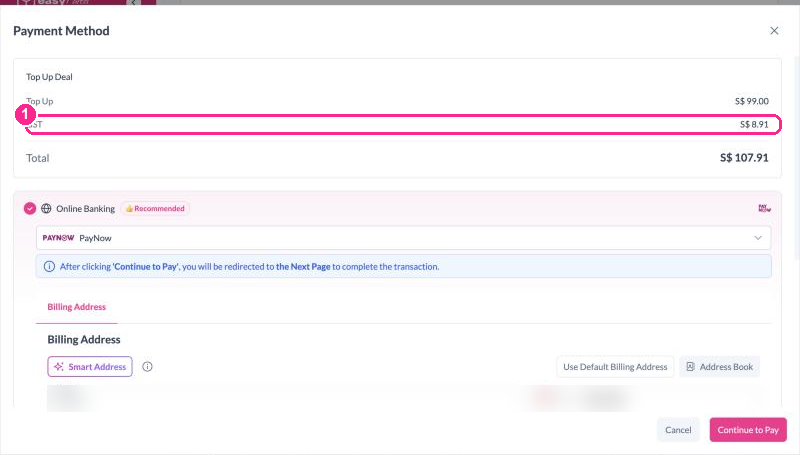
The payment page also shows the GST (1) before you pay.
At payment
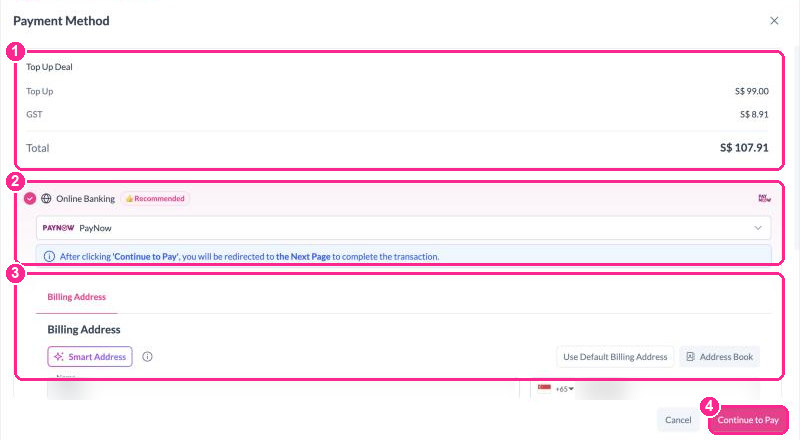
The Payment Method window shows the top-up amount, the GST and the total (1).
GST examples
GST is added to the deal price. These are the totals shown on the Top Up page:
| Deal price | GST (9%) | You pay |
|---|---|---|
| S$99 | S$8.91 | S$107.91 |
| S$299 | S$26.91 | S$325.91 |
| S$999 | S$89.91 | S$1,088.91 |
Good to know
- The amount in the payment window already includes GST.
- EasyParcel's GST registration number is shown at the bottom of every page in the app.
Related articles
What's next?
Still need help?
Our team is happy to help. ? Live Chat | ✉️ Contact Us