
Quick Summary
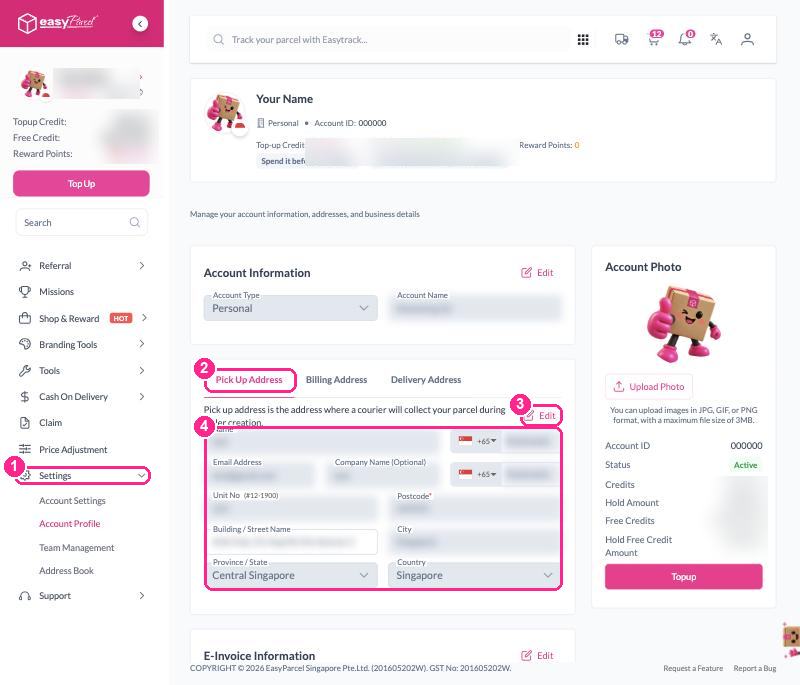
Your pick-up address is the address where the courier collects your parcel when you create an order. Set it once under Settings > Account Profile > Pick Up Address. When you book, click Use Default Pick Up Address in the Sender section to fill it in.
We'll Cover:
Set your pick-up address
- Click Settings (1) in the left menu, then Account Profile.
- Open the Pick Up Address (2) tab.
- Click Edit (3).
- Fill in the name, phone number, email and address (4), then save.
Use it when you book
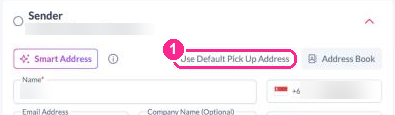
In the Sender section of the booking page, click Use Default Pick Up Address (1). You can still change the address for each order.
Still need help?
Our team is happy to help. ? Live Chat | ✉️ Contact Us