
Quick Summary
Parcel value is the total value of the items in your parcel. Enter the price of each item and the quantity when you book. The Piece value is the total, and it is used for EasyCover and for customs on international parcels.
We'll Cover:
Where to enter it?
You enter the parcel value on the booking page, in the Parcel Details section.
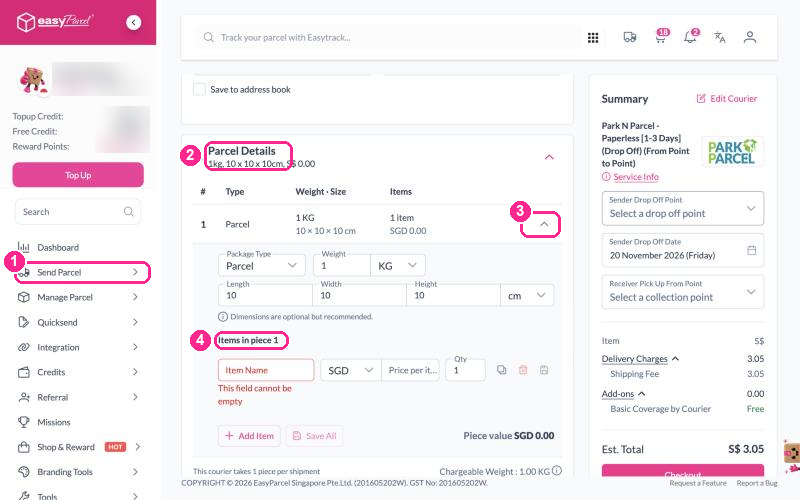
- Click Send Parcel (1) in the left menu and choose Domestic Delivery or International Delivery.
- Enter the postcodes and weight, click Quote, then click Book on the courier you want.
- On the booking page, scroll down past Sender and Receiver to Parcel Details (2).
- Click the arrow (3) on the parcel row to open it, if it is closed.
- Find Items in piece (4) under the size fields.
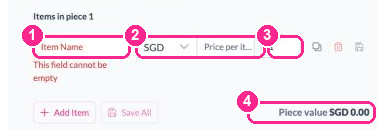
Then enter the Item Name (1), the currency and Price per item (2) and the Qty (3). The page shows the Piece value (4), for example SGD 120.00.
Why it matters?
Basic coverage is limited to your declared value.
See How does declared value affect my parcel? International parcels need accurate values for customs.
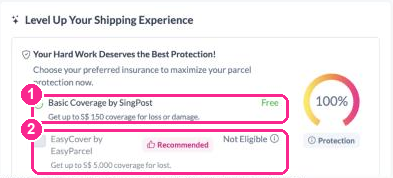
You can see the cover on the booking page: Basic Coverage (1) is free, and EasyCover (2) gives higher cover for parcels that are eligible.
In the app
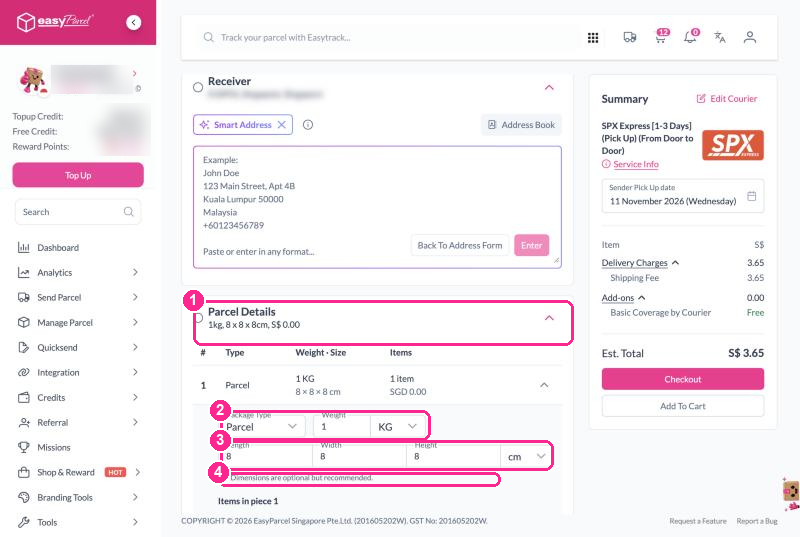
Enter the parcel value in the parcel details step when you book.
Still need help?
Our team is happy to help. ? Live Chat | ✉️ Contact Us