
Quick Summary
To book a domestic parcel, get a quote, click Book on the courier you want, fill in the sender, receiver and parcel details, choose any add-ons, then click Checkout and pay. You can also click Add To Cart to pay later.
We'll Cover:
The booking steps
- Go to Send Parcel > Domestic Delivery and get a quote.
- Click Book beside the courier you choose.
- Fill in the Sender, Receiver and Parcel Details.
- Choose your add-ons, such as extra protection or tracking notifications.
- Click Checkout and pay.
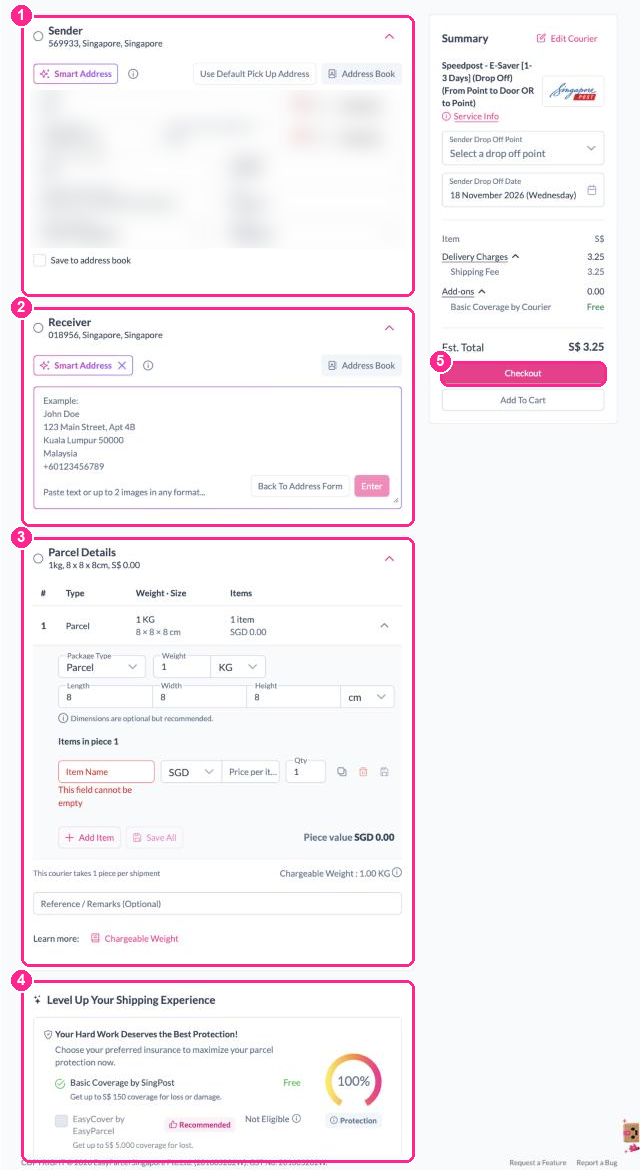
The booking page has the Sender (1), Receiver (2) and Parcel Details (3) sections, then add-ons (4). Click Checkout (5) when you are done.
The Summary panel
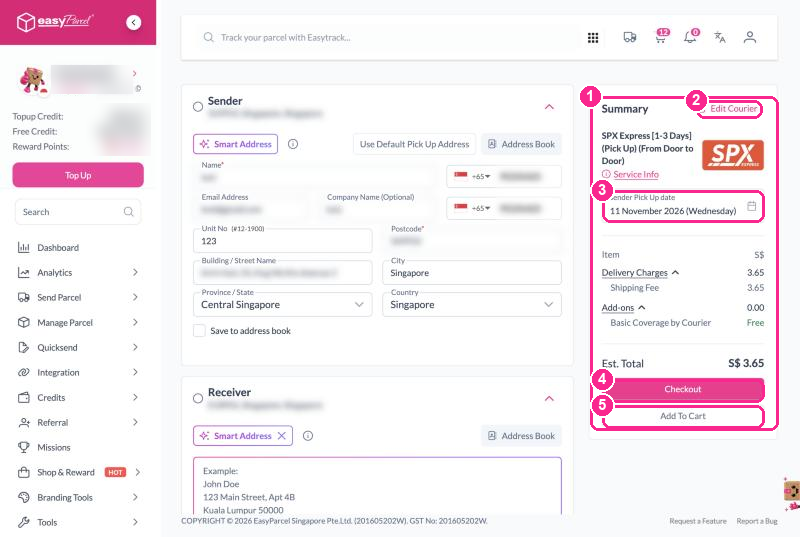
The Summary (1) on the right stays with you while you fill in the form. It shows:
- Your chosen courier. Click Edit Courier (2) to pick a different one.
- The Sender Pick Up date (3)
- Delivery charges, add-ons and the estimated total
When you are ready, click Checkout (4) to pay now, or Add To Cart (5) to save it and pay later.
Note: Your parcel is only booked after payment. Until then, it waits in Pending payment.
What's next?
Still need help?
Our team is happy to help. ? Live Chat | ✉️ Contact Us