
Quick Summary
When you click Add To Cart while booking, the parcel is saved and waits for payment. Click the cart icon at the top of any page to see all your parcels waiting for payment, then pay for them whenever you are ready.
We'll Cover:
Save a parcel to the cart
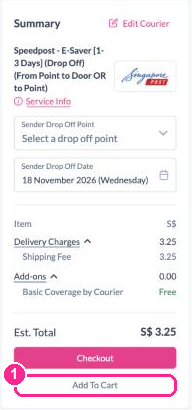
On the booking page, fill in the details and click Add To Cart (1) in the Summary instead of Checkout. You can book more parcels before paying.
Find your cart
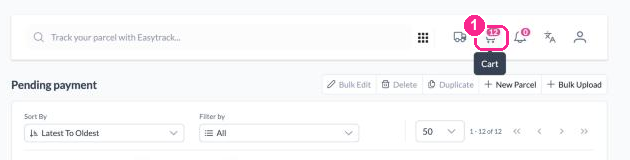
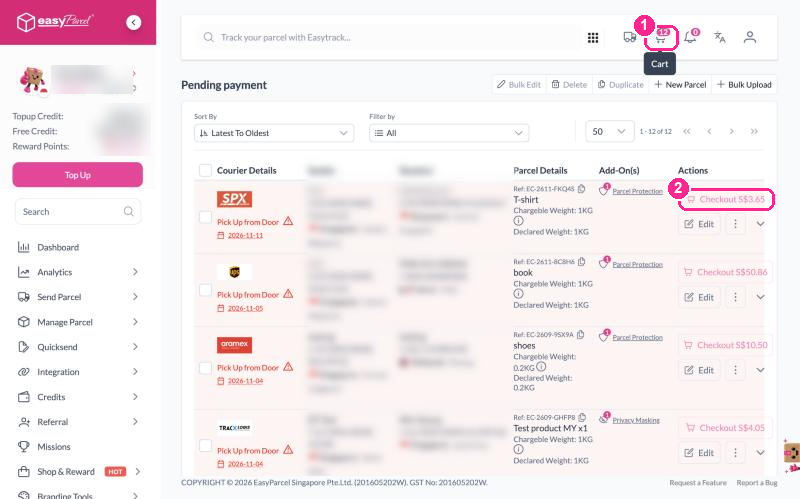
Click the cart icon (1) in the top bar. The number on it shows how many parcels are waiting. This opens the Pending payment page, where every unpaid parcel is listed.
Pay for a saved parcel
Click Checkout (2) on the parcel row to pay. You can also edit, duplicate or delete a parcel from the same row.
Note: A parcel is only booked after payment. If a pick-up date has passed, you need to change the date before you can check out. See How do I change the courier, pick-up date or add-ons before I pay?
Manage unpaid parcels
What the Pending payment page shows
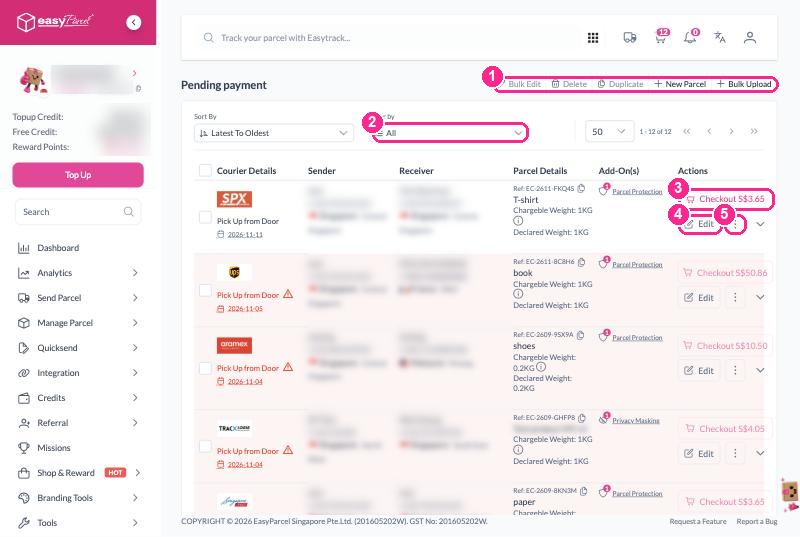
Each row shows the courier, sender, receiver, parcel details, add-ons and the amount to pay. Use Sort By and Filter by (2) to find an order, and choose how many rows to show per page.
Edit, duplicate or delete orders
- Tick the order, then use the toolbar (1): Bulk Edit, Delete or Duplicate
- Click Edit (4) on a row to change that order
- Click the more (⋮) icon (5) to Change date, Change courier, Change Add-ons, Duplicate or Delete that order
- Use New Parcel or Bulk Upload in the toolbar to add more orders
Pay for an order
Click Checkout (3) on a row to pay for that order. The button shows the amount.
Note: An order is only booked after payment. Orders that are not paid stay here.
What's next?
Still need help?
Our team is happy to help. ? Live Chat | ✉️ Contact Us