
Quick Summary
For an international parcel, list every item inside under Items in piece. For each item, enter the item name, the HS code or product, the currency and price per item and the quantity. Customs use this information to check your parcel.
We'll Cover:
Declare your items
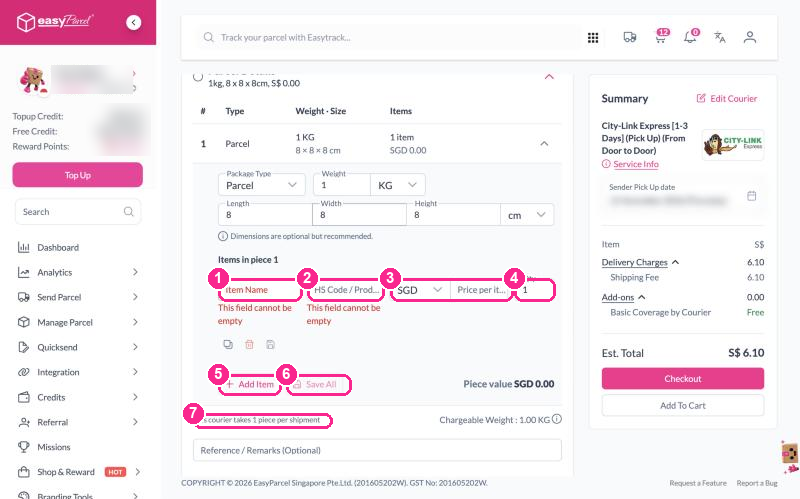
- In Parcel Details, open your parcel and find Items in piece.
- Enter the Item Name (1). This field cannot be empty.
- Enter the HS Code / Product (2). An HS code is a number customs use to identify your item.
To learn more, see How do I find the HS code for my item?
If you do not know the code, use the HS Code Finder under Tools. - Choose the currency and enter the Price per item (3).
- Enter the Qty (4).
Add more than one item
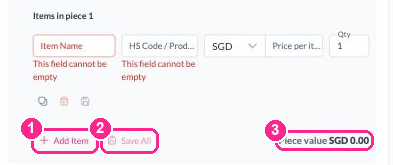
Click Add Item (5) to add another item. Click Save All (6) when you finish. The Piece value shows the total value of the items.
+ Add Item (1), Save All (2) and the Piece value (3).
Chargeable weight
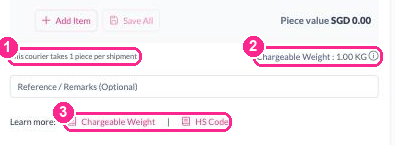
Under the items, you will see the Chargeable Weight and a note such as "This courier takes 1 piece per shipment" (7). Check it before you continue. Click the Learn more links for Chargeable Weight and HS Code.
Note: Declare your items honestly and accurately. Wrong details can delay your parcel at customs.
The pieces note (1), the Chargeable Weight (2) and the Learn more links (3).
What's next?
Still need help?
Our team is happy to help. ? Live Chat | ✉️ Contact Us