
Quick Summary
An HS code tells customs what is inside your parcel. International parcels need one for each item. Use the HS Code Finder under Tools to get a suggested code. Type what you are shipping, click Get Shipping Insights, then copy the code.
We'll Cover:
Find a suggested HS code
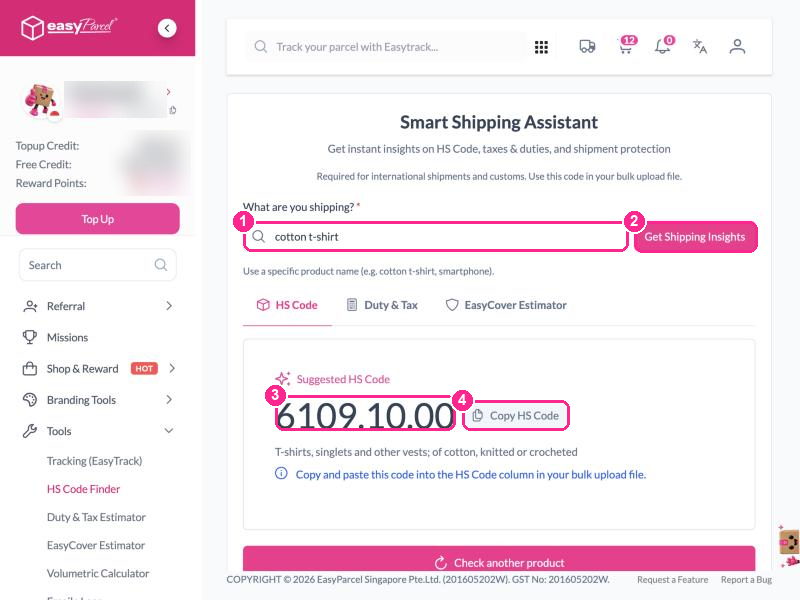
- Click Tools > HS Code Finder in the left menu.
- In What are you shipping? (1), enter a specific product name, for example cotton t-shirt or smartphone.
- Click Get Shipping Insights (2).
- The Suggested HS Code (3) and its description appear. Click Copy HS Code (4).
Use it in your booking or bulk file
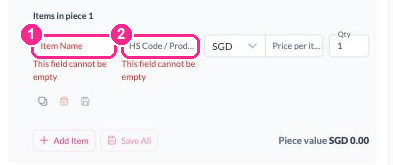
Paste the code into the HS Code field when you declare your items, or into the HS Code column of your bulk upload file. See How do I declare my items for an international parcel?
Tip: Use a specific product name. A general word gives a less accurate suggestion. The code is a suggestion, so check that it matches your item.
Paste the code in HS Code / Product (2), next to the Item Name (1).
What's next?
Still need help?
Our team is happy to help. ? Live Chat | ✉️ Contact Us