
Quick Summary
The Duty & Tax Estimator gives you an estimate of the import duty and tax for an international parcel before you ship. Open Tools > Duty & Tax Estimator, enter the route, weight, value and category, then click Estimate duty & tax.
We'll Cover:
How to estimate duty and tax?
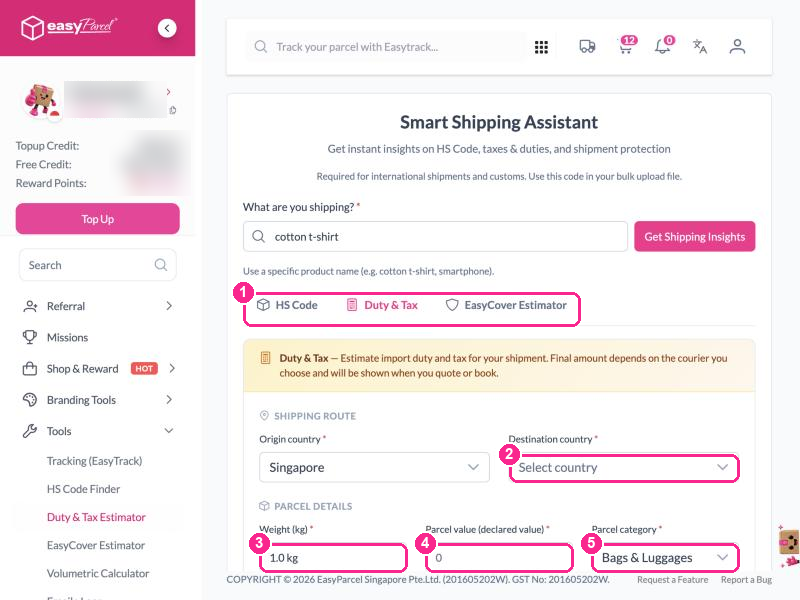
- Click Tools > Duty & Tax Estimator, or open the Duty & Tax tab (1).
- Choose the Destination country (2). The origin is Singapore.
- Enter the Weight (3) and the Parcel value (4).
- Choose the Parcel category (5).
- Click Estimate duty & tax.
Important: All DDU and DDP duty and tax amounts shown in the EasyParcel app are estimates only. The final charges are always decided by the customs of the destination country.
For a more accurate estimate
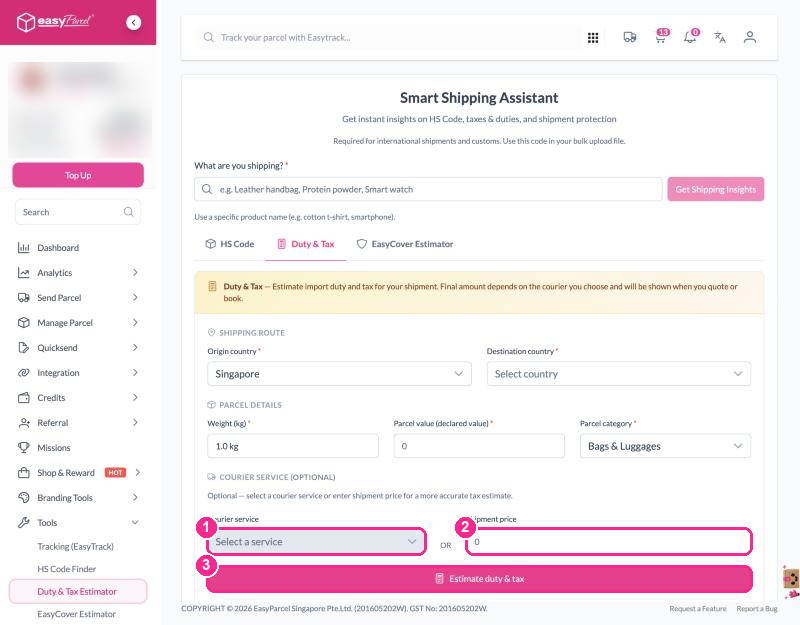
You can also choose a courier service or enter the shipment price (optional). The final amount depends on the courier you choose and is shown when you quote or book. Click Quote and book for the exact amount.
Note: The estimate is a guide only. The final duties and taxes are set by customs and the courier. See What do DDU and DDP mean?
Choose a courier service (1) or enter the shipment price (2), then click Estimate duty & tax (3).
What's next?
Still need help?
Our team is happy to help. ? Live Chat | ✉️ Contact Us