
Quick Summary
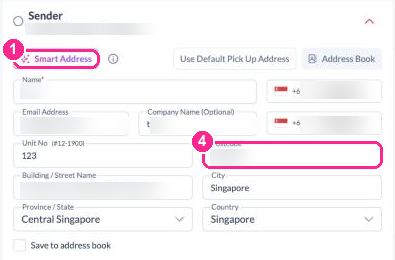
In the Sender section, enter the name, contact number and pick-up address. To save time, use Smart Address, your default pick-up address or your Address Book.
We'll Cover:
Fill in sender details
- Open the Sender section.
- Enter the Name, Email Address and phone number. Add a Company Name if you want (optional).
- Enter the Unit No, Building / Street Name and check the Postcode (4).
Click Smart Address (1) to paste a full address and let EasyParcel fill in the fields for you.
Use a saved address
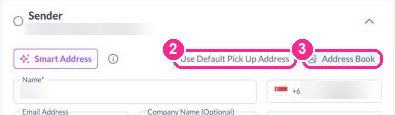
- Use Default Pick Up Address (2) – fills in the address you set as your default
- Address Book (3) – choose an address you saved before
Save an address for next time
Tick Save to address book (5) before you continue.
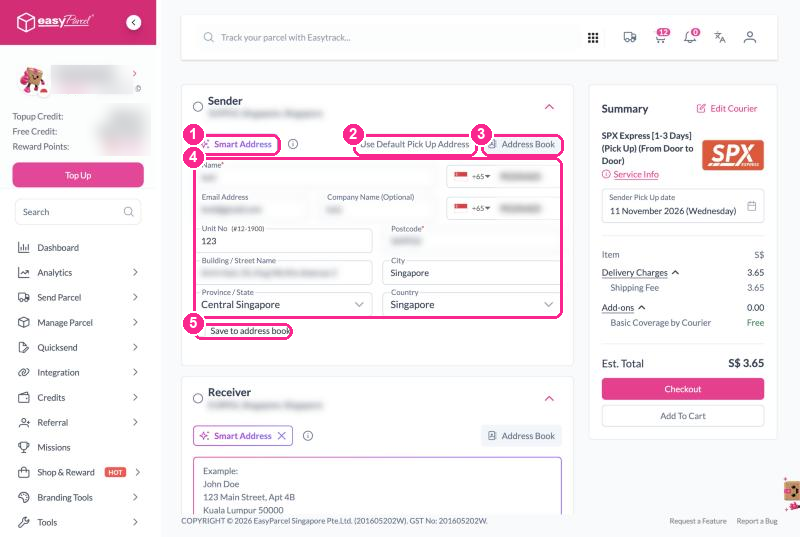
Note: Fields marked with a red * are required.
What's next?
Still need help?
Our team is happy to help. ? Live Chat | ✉️ Contact Us