
Quick Summary
On the checkout page, first review your shipment, then check the price breakdown and click Pay with Credit. Before you pay, you can also add a coupon or use your free credits. Your parcel is booked once payment is complete.
We'll Cover:
Review your shipment
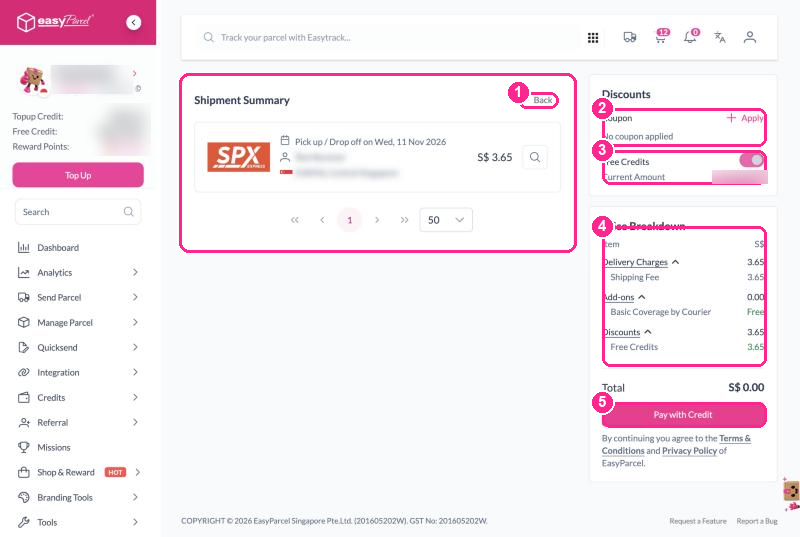
Before you pay, check the Shipment Summary (highlighted on the left). For each parcel, make sure these are correct:
- The courier and service
- The pick-up or drop-off date
- The receiver
- The price of the parcel
If anything is wrong, click Back (1) to return to the booking page and change it.
Check the price and pay
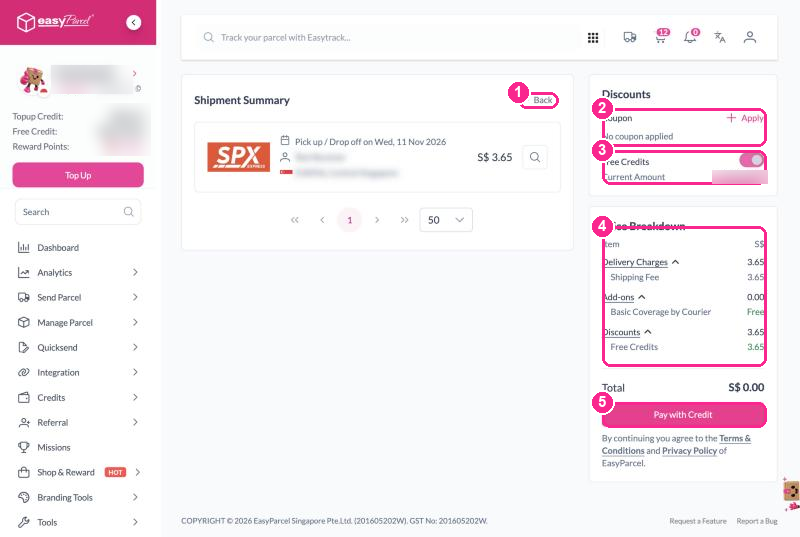
On the right, the Price Breakdown (4) shows what you pay:
- Delivery Charges – the shipping fee
- Add-ons – for example basic coverage or EasyCover
- Discounts – any coupon or free credits you use
Check the Total below it. When everything is correct, click Pay with Credit (5).
Note: By paying, you agree to the Terms & Conditions and Privacy Policy shown below the button.
Coupons and free credits
Before you click Pay with Credit, you can lower your total under Discounts:
- Coupon (2) – click Apply and enter your coupon code
- Free Credits (3) – turn on the switch to use your free credits. Your current amount is shown below it
The discount then shows under Discounts in the Price Breakdown (4), and the Total goes down.
What's next?
Still need help?
Our team is happy to help. ? Live Chat | ✉️ Contact Us