
Quick Summary
In the Receiver section, click Smart Address, paste the full receiver address in any format and click Enter. EasyParcel fills in the name, phone and address fields for you. You can also pick a saved receiver from your Address Book.
We'll Cover:
Add the receiver with Smart Address
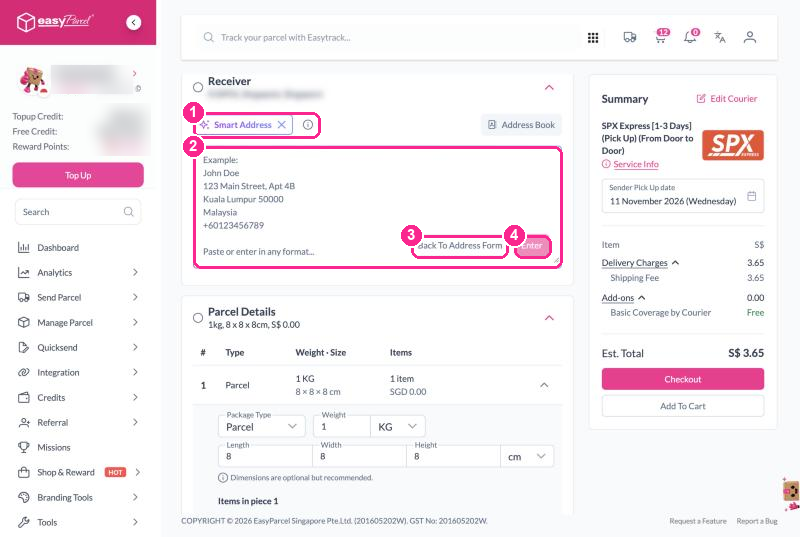
- Open the Receiver section and make sure Smart Address (1) is on.
- Paste or type the name, address and phone number in the box (2), in any format.
- Click Enter (4). The fields are filled in for you.
- Check that everything is correct before you continue.
Fill in the form yourself
Click Back To Address Form ((3) in the screenshot above) to type each field by hand.
Tip: Always check the postcode and phone number, because the courier uses them to deliver your parcel.
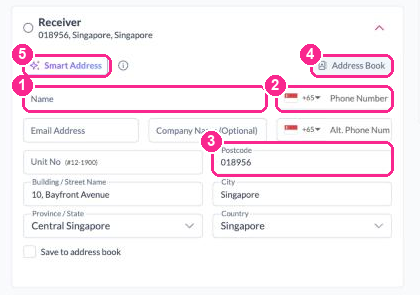
Type the receiver's Name (1), Phone Number (2) and address. The Postcode (3) comes from your quote. You can also pick a saved address from Address Book (4), or turn Smart Address (5) back on to paste the address.
What's next?
Still need help?
Our team is happy to help. ? Live Chat | ✉️ Contact Us