
Quick Summary
In Parcel Details, choose the package type, enter the weight and size, and describe what is inside. Use the same weight and size you used in your quote so your price stays accurate.
We'll Cover:
Package type, weight and size
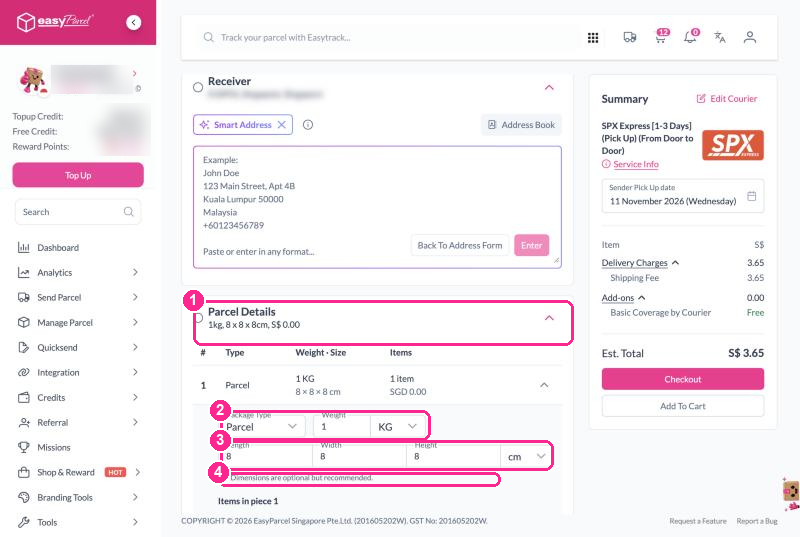
- Open Parcel Details (1).
- Choose the Package Type and enter the Weight (2).
- Enter the Length, Width and Height (3).
The page reminds you (4) that dimensions are optional but recommended.
Describe the items
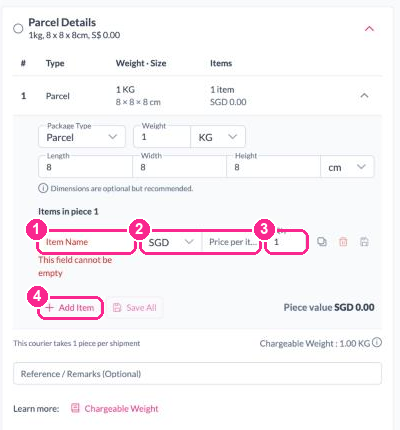
Under Items in piece, tell us what is inside the parcel. The details you enter help the courier handle your parcel.
Note: If the weight or size looks too small, a suggestion may appear. See How do I get an accurate delivery rate?.
Enter the Item Name (1), the currency and price per item (2) and the quantity (3). Click + Add Item (4) to add more items.
What's next?
Still need help?
Our team is happy to help. ? Live Chat | ✉️ Contact Us