
Quick Summary
International bookings use the same Sender and Receiver sections as domestic ones, with two extra fields for each: Is this residential address? and a Tax ID. Both are optional and will not block your booking, but filling them in helps customs clearance and keeps your quote accurate. The receiver address uses the destination country's format, so check it carefully.
We'll Cover:
Sender details
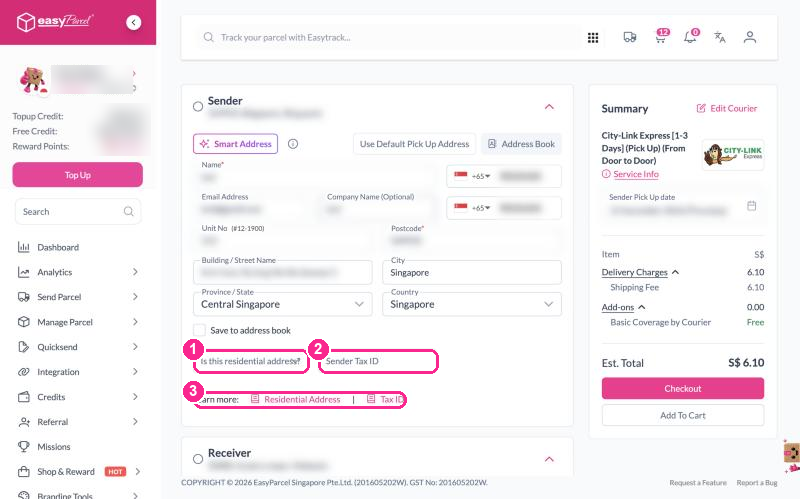
Fill in the sender as you would for a domestic parcel (see How do I fill in the sender details?). Then answer Is this residential address? (1) and enter the Sender Tax ID (2) if you have one.
Receiver details
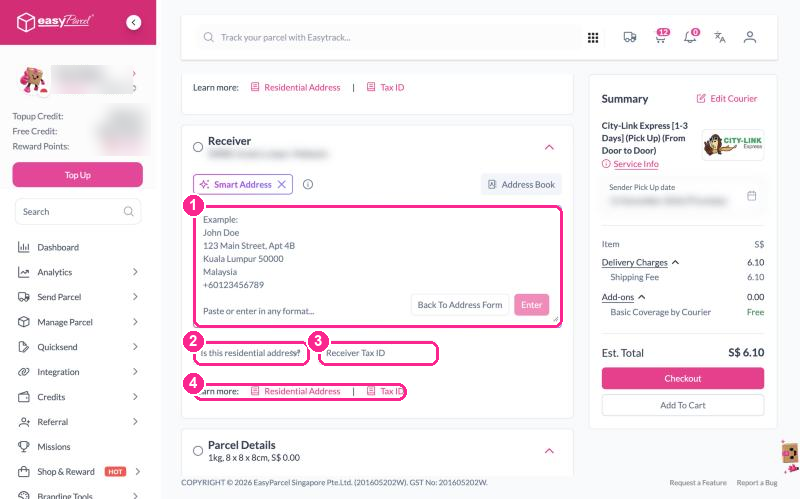
Use Smart Address (1) and paste the receiver's full address with the country and phone number, in the format of the destination country. Then answer Is this residential address? (2) and enter the Receiver Tax ID (3) if you have one.
Residential address and Tax ID
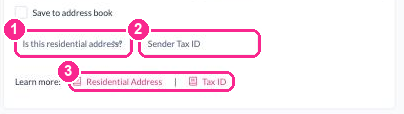
Click the Learn more (3) (4) links under each section to read about Residential Address and Tax ID.
Note: Both fields are optional. A receiver Tax ID is needed only for UPS from Malaysia to Vietnam and TracX Logis to South Korea. See Do I need a Tax ID for my international parcel?
Tip: Always include the receiver's phone number with the country code, because the courier may need to contact them.
Is this residential address? (1), the Tax ID box (2) and the Learn more links (3). The links open the help guide in a new tab.
What's next?
Still need help?
Our team is happy to help. ? Live Chat | ✉️ Contact Us