
Quick Summary
Widgets are small tools you can add to your own website: an EasyTrack tracking widget, a Volumetric Calculator and a Delivery Rate Checker. Open Tools > Widgets.
We'll Cover:
The three widgets
- EasyTrack (1): a shipment tracking widget for your website
- Volumetric Calculator (2): calculates volumetric weight on your website
- Delivery Rate Checker (3): checks shipping rates from multiple couriers on your website
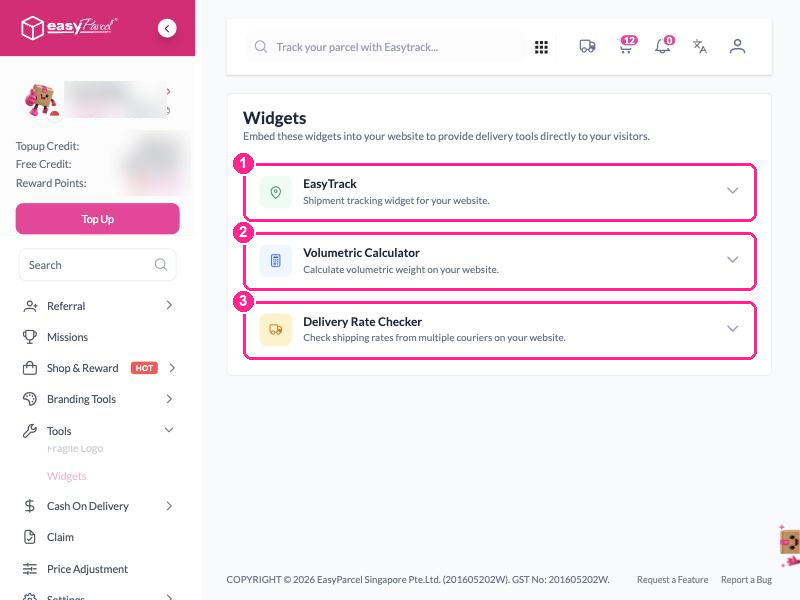
Add a widget to your website
- Open Tools > Widgets and click the widget, for example EasyTrack (1).
- Copy the Embed Code (2). Click the copy icon at the end of the code.
- Paste it into your website's HTML where you want the widget. Check how it looks in the Preview (3).
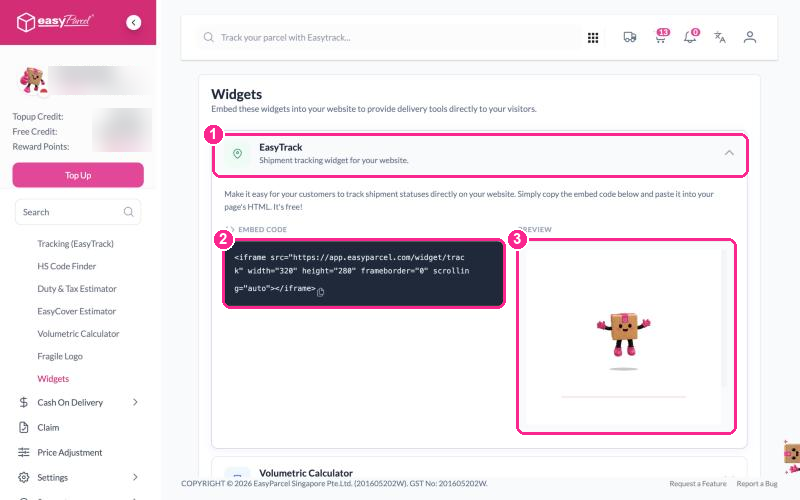
| Widget | Embed code |
|---|---|
| EasyTrack | <iframe src="https://app.easyparcel.com/widget/track" width="320" height="280" frameborder="0" scrolling="auto"></iframe> |
| Delivery Rate Checker | <iframe src="https://app.easyparcel.com/widget/rate-checker" width="320" height="480" frameborder="0" scrolling="auto"></iframe> |
| Volumetric Calculator | Copy it from Tools > Widgets > Volumetric Calculator |
The widgets are free.
What's next?
Still need help?
Our team is happy to help. ? Live Chat | ✉️ Contact Us