
Quick Summary
The Smart Shipping Assistant brings three tools together: HS Code, Duty & Tax and EasyCover Estimator. Type what you are shipping to get an HS code, then estimate duties and the EasyCover fee.
We'll Cover:
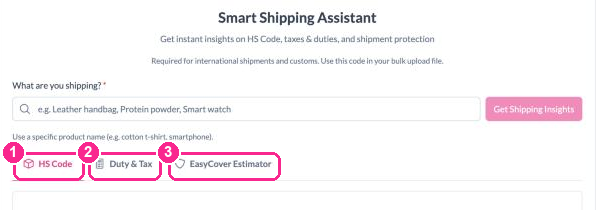
The three tabs
Use the tabs to switch between the three tools:
- HS Code (1): enter a product name and click Get Shipping Insights. See How do I find the HS code for my item?
- Duty & Tax (2): estimate duty and tax. See How do I estimate duties and taxes for an international parcel?
- EasyCover Estimator (3): estimate the EasyCover fee. See How much does EasyCover cost for each courier?
In the app
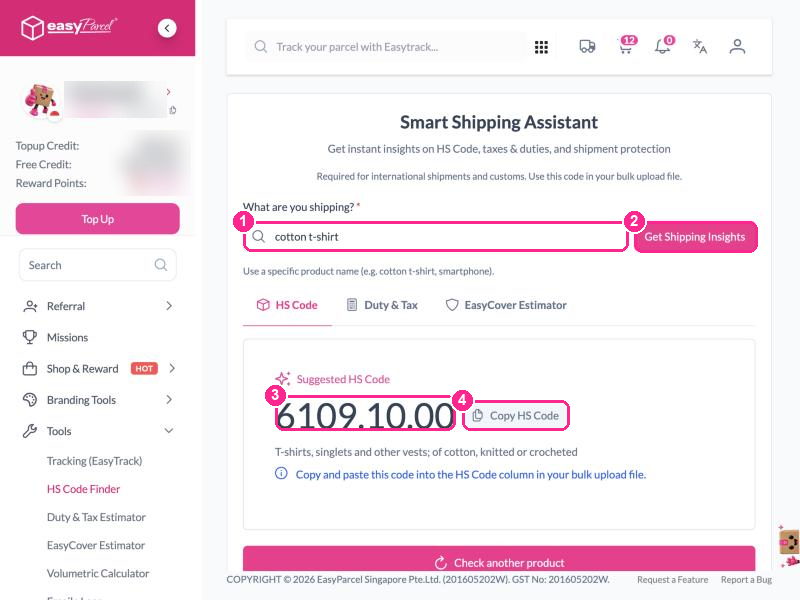
Open Tools > HS Code Finder. Type your item in What are you shipping? (1), click Get Shipping Insights (2), then copy the suggested HS code (3) (4). Use the tabs at the top to switch to Duty & Tax or EasyCover Estimator.
Still need help?
Our team is happy to help. ? Live Chat | ✉️ Contact Us