
Quick Summary
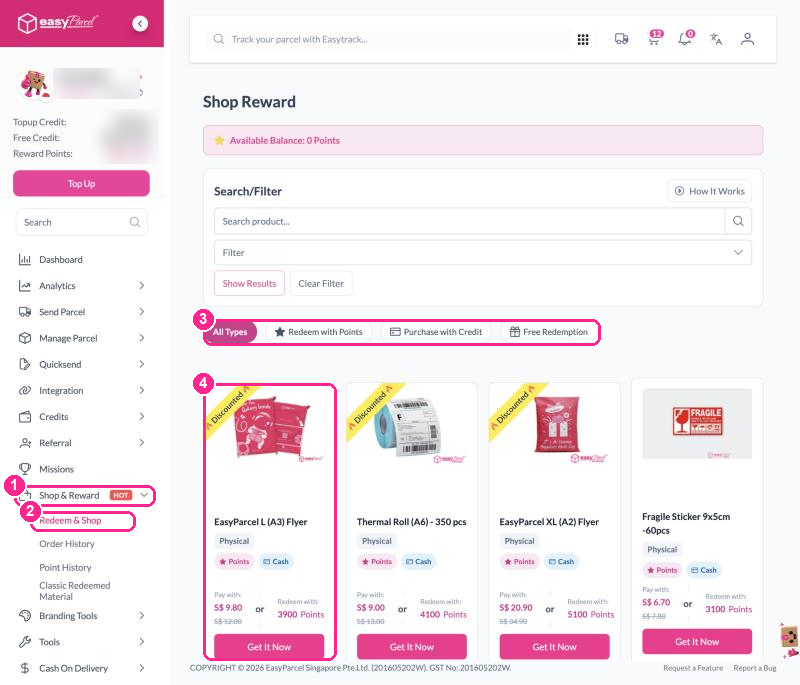
In Shop & Reward > Redeem & Shop, choose Redeem with Points to see items you can pay for with points. Some items can also be bought with credit.
We'll Cover:
Redeem with points
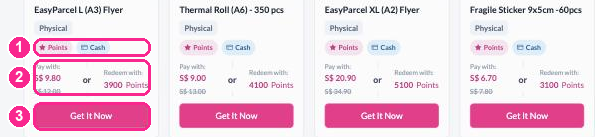
Each item in the Shop shows how you can get it:
- Payment tags (1): whether you can pay with Points, Cash or both.
- Price (2): Pay with shows the price in credit, and Redeem with shows the points you need.
- Get It Now (3): click it to get the item.
See Where can I get packing materials? for the Shop.
Redeem an item
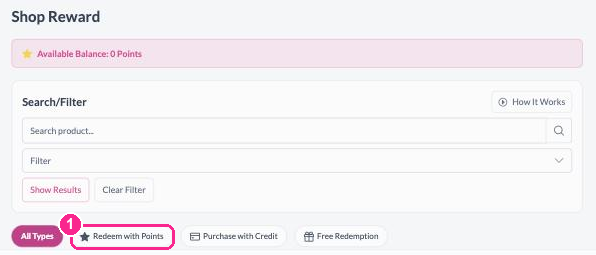
- Open Shop & Reward > Redeem & Shop and click Redeem with Points (1).
- Click Get It Now on the item.
- Choose the quantity and enter your delivery details.
- Pay with points, or points and credit, and confirm.
- Follow your order in Shop & Reward > Order History. See How do I track my Shop order?
In the app
Open Shop & Reward to browse items you can redeem.
Still need help?
Our team is happy to help. ? Live Chat | ✉️ Contact Us