
Quick Summary
After you buy or redeem an item in Shop & Reward, follow it in Order History.
We'll Cover:
Open Order History
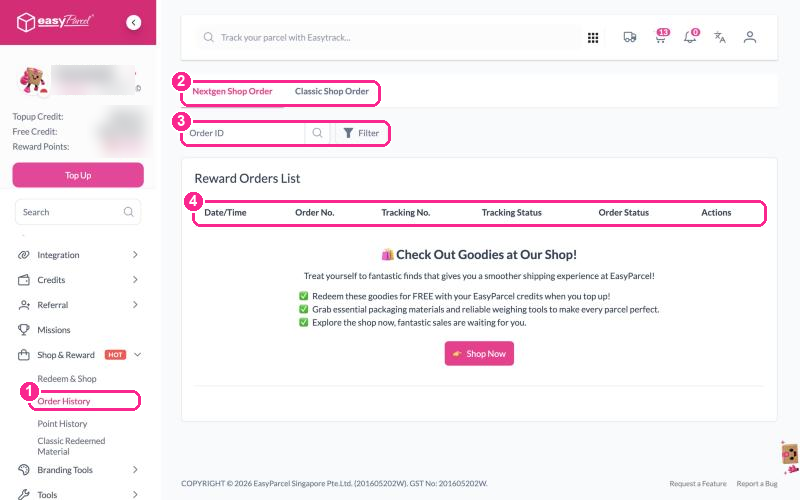
Click Shop & Reward > Order History (1) in the left menu. Use the Nextgen Shop Order and Classic Shop Order tabs (2) and search by Order ID or use Filter (3). Each order shows its date, order number, tracking number, tracking status and order status (4).
When will my item arrive?
To follow your item, check the Tracking No. and Tracking Status columns in the order list (4).

Something wrong with my order?
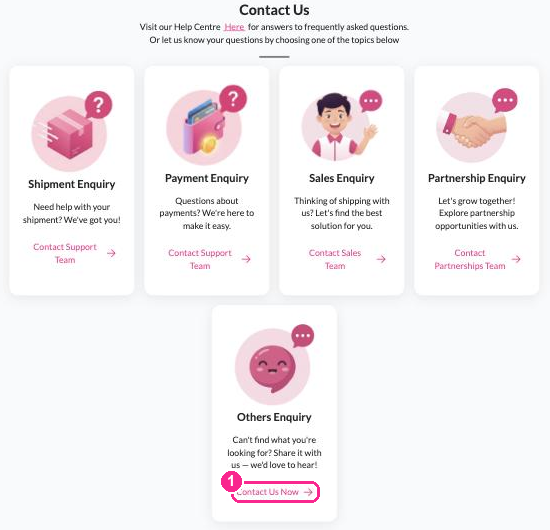
Contact our support team from Contact Us. Click Contact Us Now (1) under Others Enquiry and include your order number.
Still need help?
Our team is happy to help. ? Live Chat | ✉️ Contact Us