
Quick Summary
Missions are tasks that earn you points and badges. Open Missions in the left menu to see your points, badges and your missions.
We'll Cover:
- The Missions page
- What the page shows
- When there are no missions
- Related articles
The Missions page
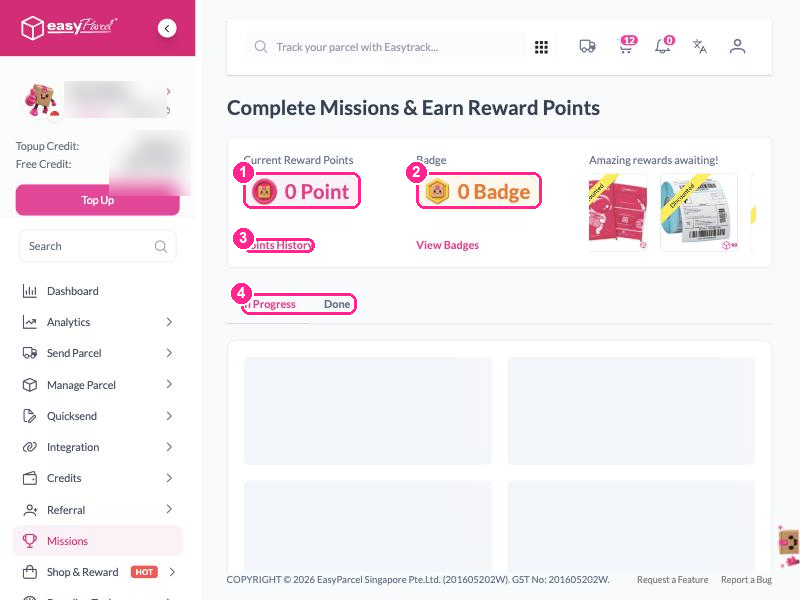
The top shows your Current Reward Points (1) and your Badges (2). Click Points History (3) to see your points. Your missions are in the In Progress and Done tabs (4). When there are no challenges, the page suggests you earn points with a top-up.
What the page shows
- Current Reward Points at the top, with a Points History link.
- Your badge count, with a View Badges link. If you have none, the page says "No Badges Yet".
- Your missions in the In Progress and Done tabs.
- Top Up Rewards, which shows the points you get with each top-up deal, for example +99 points with the EP99 deal.
When there are no missions
The page says "No challenges available right now" and suggests you earn points through a top-up. New challenges and badges are released from time to time, so check back later.
Related articles
What's next?
Still need help?
Our team is happy to help. ? Live Chat | ✉️ Contact Us