
Quick Summary
See how you earned and used points in Shop & Reward > Point History. You can filter by date and transaction type.
We'll Cover:
- Open Point History
- In the app
- Filters and what you can see
- Good to know
- Related articles
Open Point History
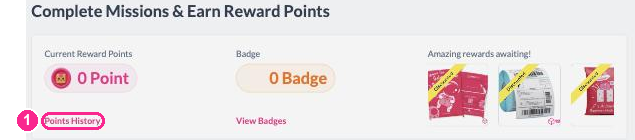
Click Shop & Reward > Point History in the left menu, or Points History (1) on the Missions page. The page lists points from top-ups, promos and activities, each redemption with its date and item, and expiry dates. Use the filters and the NextGen and Classic tabs.
In the app
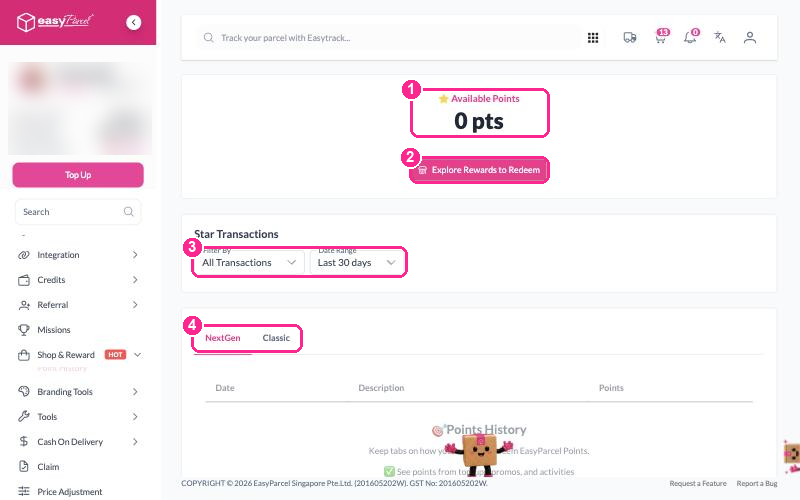
Open Shop & Reward > Points History. You see your Available Points (1), Explore Rewards to Redeem (2), the filters and dates (3), and the NextGen and Classic tabs (4).
Filters and what you can see
- Use the first filter to choose the transaction type (the default is All Transactions) and the second to choose the dates (the default is Last 30 days).
- Click Show Results to apply them, or Clear Filter to start again.
- The page shows the points you earned from top-ups, promos and activities, and every redemption with its date and item.
- You can also spot the expiry dates of your points here.
Good to know
If you do not see older points, change the date range. The list starts with the last 30 days.
Related articles
What's next?
Still need help?
Our team is happy to help. ? Live Chat | ✉️ Contact Us