
Quick Summary
Our new EasyParcel dashboard is faster and easier to use. Everything sits in one clear left-side menu, you can switch between EasyParcel products (Send Parcel, WhatsApp Blaster, Email and AI Agent) from the top bar, and booking is quicker with new helpers such as Smart Address, Smart Dimensions and the HS Code helper. Your account, credit balance and parcels stay the same — just log in and start shipping.
We'll Cover:
- A new look and easier navigation
- Faster booking with smart helpers
- New tools and features
- Where did everything move?
A new look and easier navigation
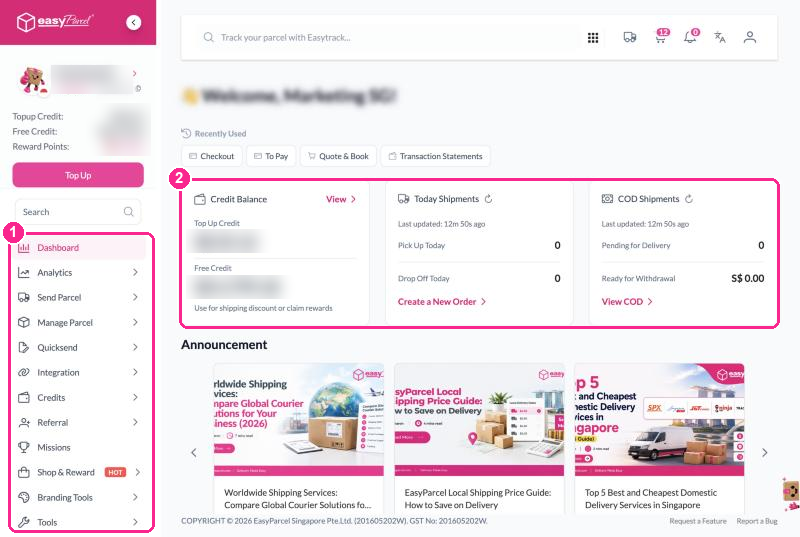
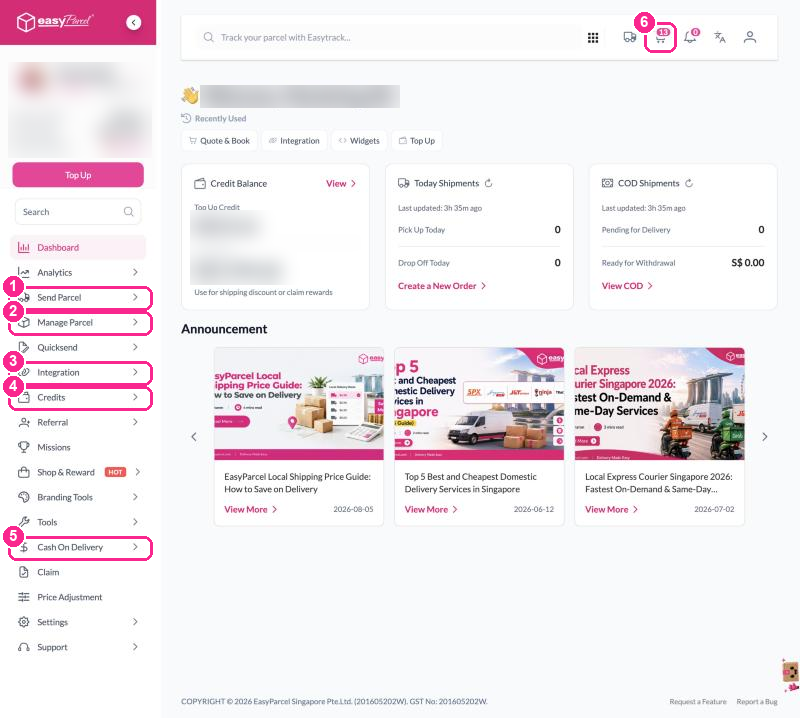
All features are grouped in the left menu (1), so you can reach any page in one or two clicks. Your Dashboard (2) shows your credit balance, today’s shipments and your COD status on one page.
Faster booking with smart helpers
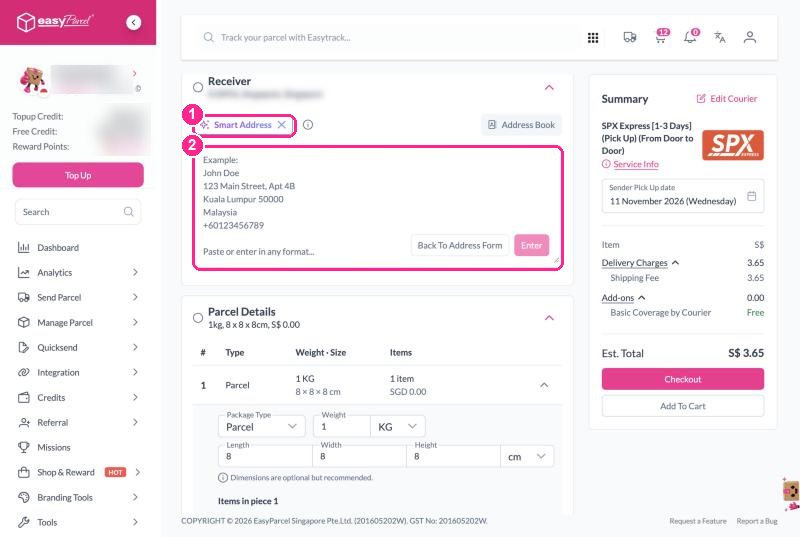
Smart Address: click "Smart Address" (1), paste the full receiver address in any format (2) and click "Enter". EasyParcel fills in every field for you.
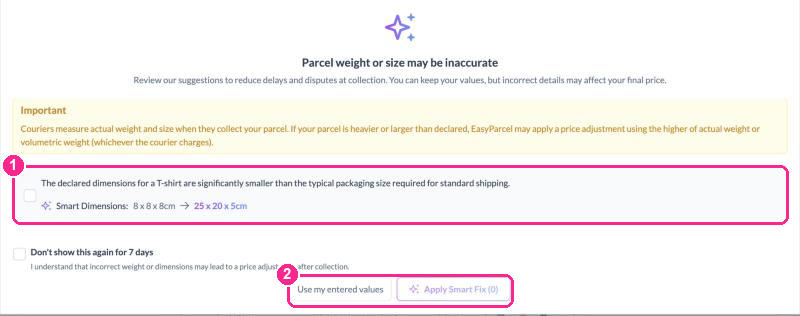
Smart Dimensions: if your parcel size looks unusual for the item you declared, EasyParcel suggests a more realistic size (1). Choose to apply the fix or keep your values (2). This helps you avoid delays and price adjustments at collection.
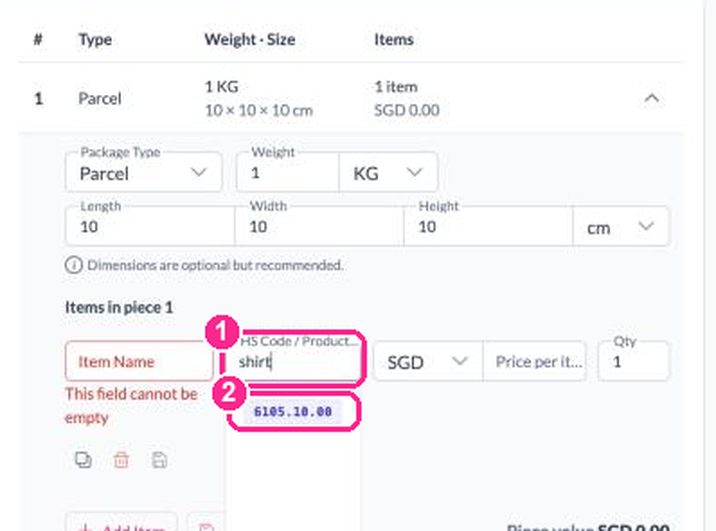
HS Code helper: for international parcels, every item needs an HS code. When you book, type a simple product keyword in HS Code / Product Keyword (1), for example "shirt". EasyParcel suggests a matching HS code (2). Click it to fill it in. If nothing matches, try a different keyword, or type your own 6, 8 or 10-digit code. You can also use Tools > HS Code Finder. See How do I find the HS code for my item?
New tools and features
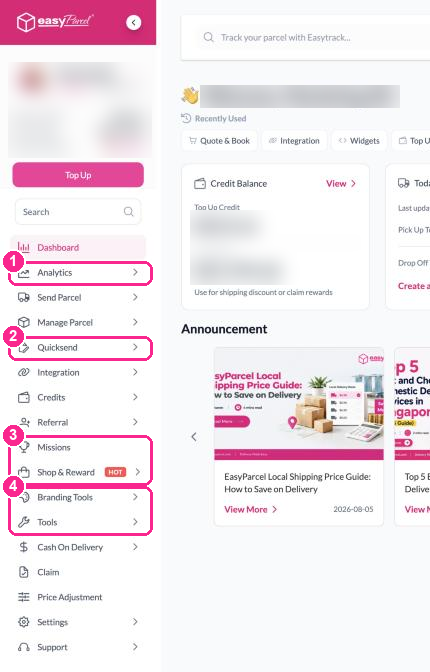
- Analytics – Overview, Business report and Team analytics
- Quicksend – Form, Orders and Payout
- Missions and Shop & Reward – earn and redeem rewards
- Branding Tools – Tracking SMS, Tracking Email, AWB Branding and EasyTrack Branding
- Tools – EasyTrack, HS Code Finder, Duty & Tax Estimator, EasyCover Estimator, Volumetric Calculator, Fragile Logo and Widgets
- Team Management – add team members to your account under Settings
- EPPY – the EasyParcel assistant, at the bottom right of every page
Note: Your existing credit, parcels and settings are kept. You do not need to create a new account.
In the left menu: Analytics (1), Quicksend (2), Missions and Shop & Reward (3), Branding Tools and Tools (4).
Where did everything move?
If you used EasyParcel before, here is where to find the main features now:
| What you want to do | Where it is now |
|---|---|
| Book a parcel | Send Parcel > Domestic, International or On-Demand Delivery |
| Book many parcels | Send Parcel > Bulk Upload |
| See and track your parcels | Manage Parcel > All Parcels |
| Pay for parcels you saved | Cart icon on the top bar |
| Top up and see statements | Credits > Top Up, Auto Topup, Transaction Statements |
| Connect your online store | Integration > Add Ecommerce App |
| Cash on Delivery | Cash On Delivery > COD Shipment Listing, COD Payout Listing |
| Points, coupons and rewards | Missions and Shop & Reward |
| Your profile, addresses and team | Settings > Account Settings, Account Profile, Team Management, Address Book |
| Get help | Support > Contact Us, Live Chat, Video Tutorial |
| Ask a quick question | EPPY, the EasyParcel assistant, at the bottom right of every page |
New to the dashboard? Watch the short videos. See Where can I watch EasyParcel video tutorials?
In the left menu: Send Parcel (1), Manage Parcel (2), Integration (3), Credits (4) and Cash On Delivery (5). The Cart (6) is on the top bar.
What's next?
Still need help?
Our team is happy to help. ? Live Chat | ✉️ Contact Us