
Quick Summary
Tracking Email lets you send your receiver a branded tracking email. Design it under Branding Tools > Tracking Email with your logo, colour, text and banner, then submit it for review. The page shows an extra fee per recipient.
We'll Cover:
Compose your email
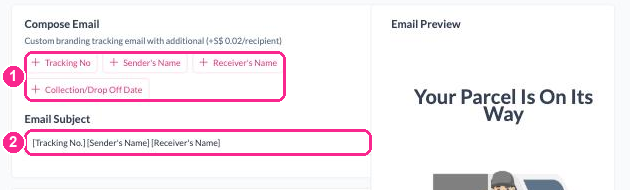
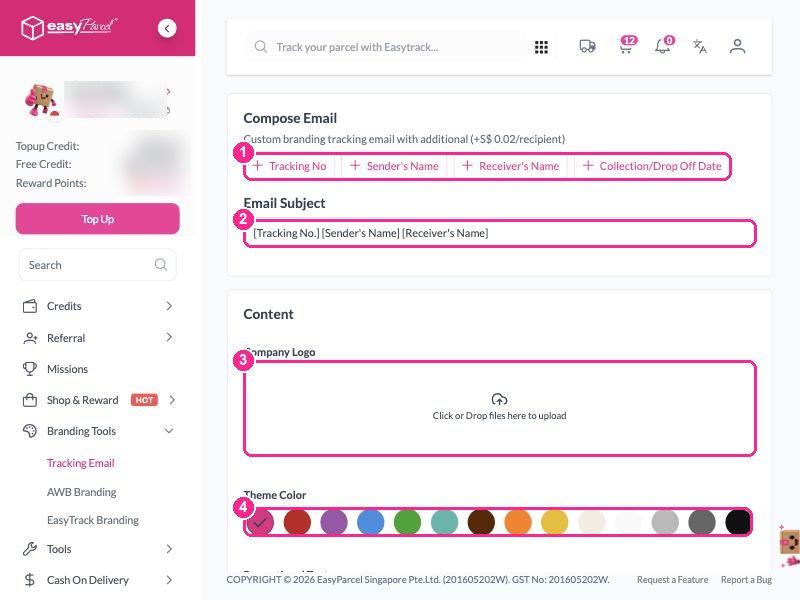
Open Branding Tools > Tracking Email. Add the tags you need (1): Tracking No, Sender's Name, Receiver's Name and Collection/Drop Off Date. Edit the Email Subject (2).
Add your branding
- Company Logo (3) – click or drop a file to upload
- Theme Color (4) – choose a colour
- Promotional Text and Promotional Banner – add a message or an image
- Remove EasyParcel branding – remove the EasyParcel text for an extra fee shown on the page
Submit for review
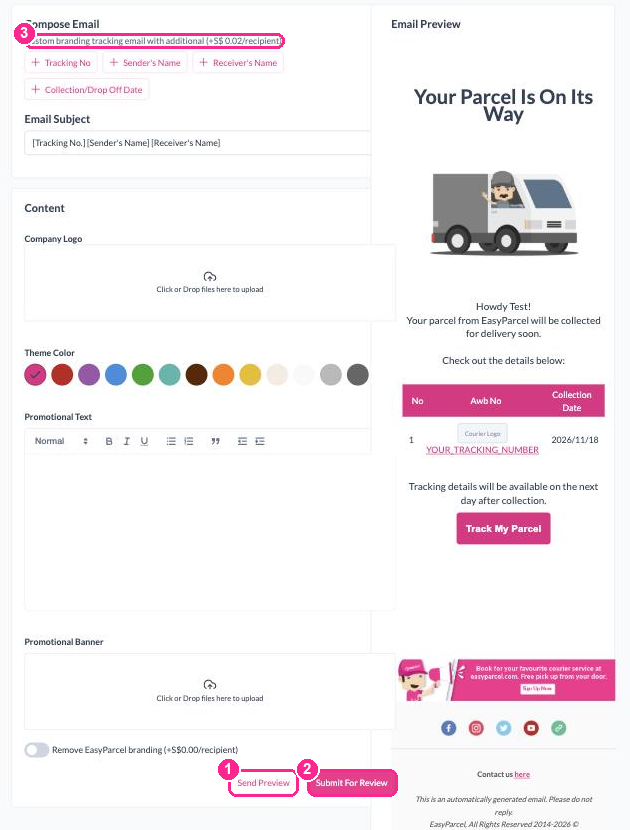
Click Send Preview (1) to check your email, then Submit For Review (2). The fee per recipient (3) for a custom branded tracking email is shown at the top of the page.
Note: Fees are shown on the page before you submit and can change.
What's next?
Still need help?
Our team is happy to help. ? Live Chat | ✉️ Contact Us