
Quick Summary
Privacy masking hides details on the shipping label (AWB) so your information stays private. Choose what to hide in Settings > Account Settings > Privacy Masking (AWB). The settings apply to future orders.
We'll Cover:
What you can mask?
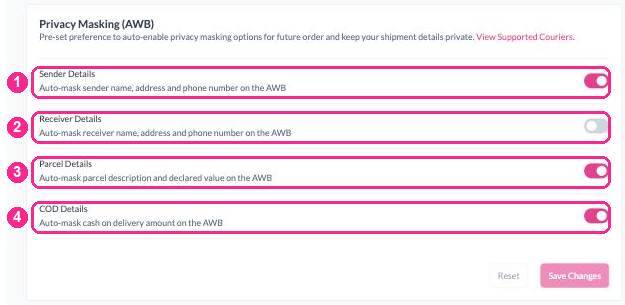
- Sender Details (1) – sender name, address and phone number
- Receiver Details (2) – receiver name, address and phone number
- Parcel Details (3) – parcel description and declared value
- COD Details (4) – cash on delivery amount
How to turn it on?
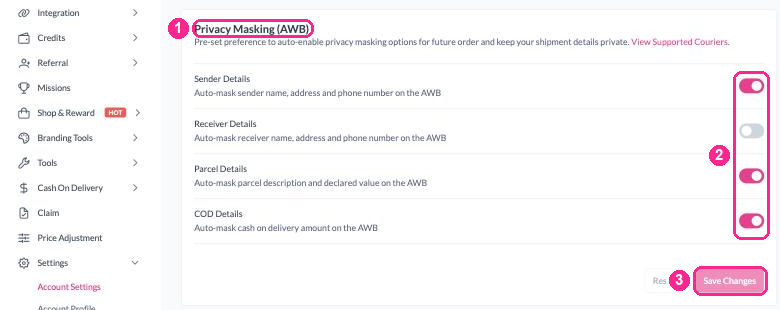
- Go to Settings > Account Settings and find Privacy Masking (AWB) (1).
- Switch on the details you want to mask (2).
- Click Save Changes (3).
Which couriers support it?
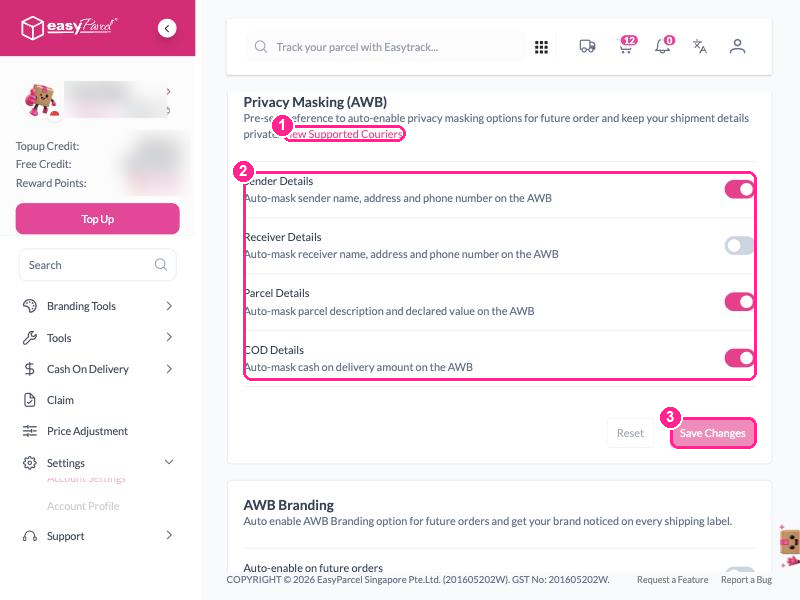
Click View Supported Couriers (1) to see the couriers that support masking.
Note: The settings apply to future orders, not to parcels you have already booked.
Still need help?
Our team is happy to help. ? Live Chat | ✉️ Contact Us