
Quick Summary
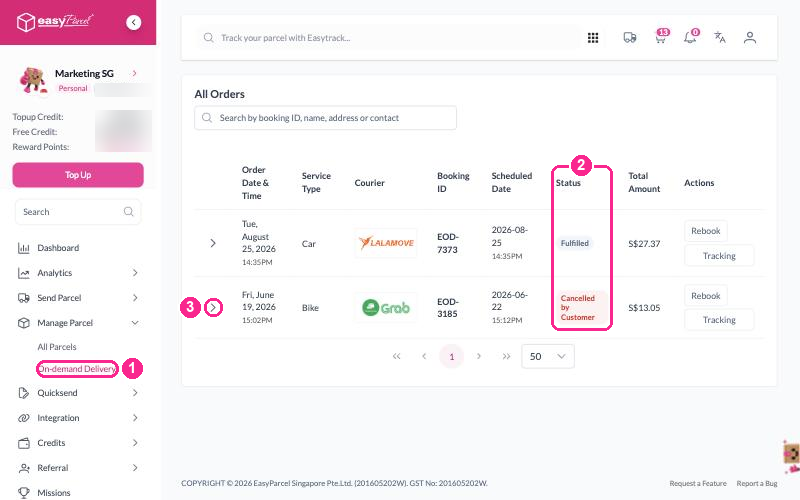
When you pay, EasyParcel books your job with the couriers you chose and waits for the first driver to accept. After that, the Status column in Manage Parcel > On-demand Delivery shows where the order is, for example Fulfilled or Cancelled by Customer.
We'll Cover:
While we find you a driver
How it starts:
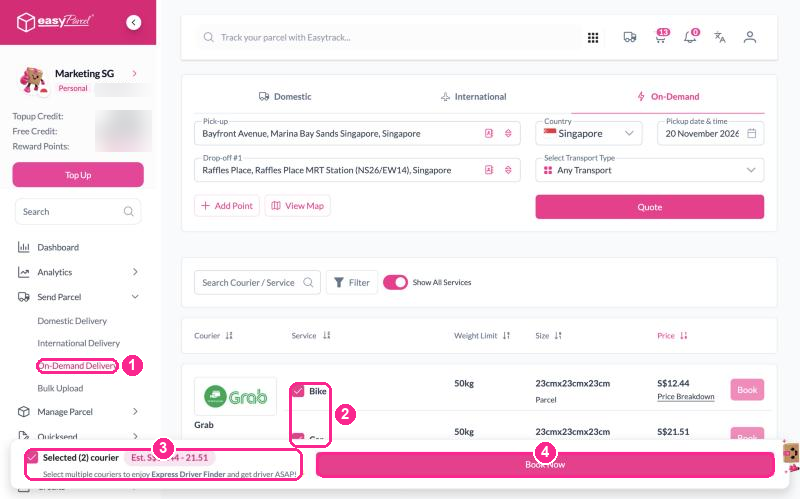
- Click On-Demand Delivery (1) and get a quote. Tick one or more courier options (2). The bar at the bottom shows Selected (2) courier (3) with the price range. Picking more options uses Express Driver Finder to get a driver faster. Click Book Now (4).
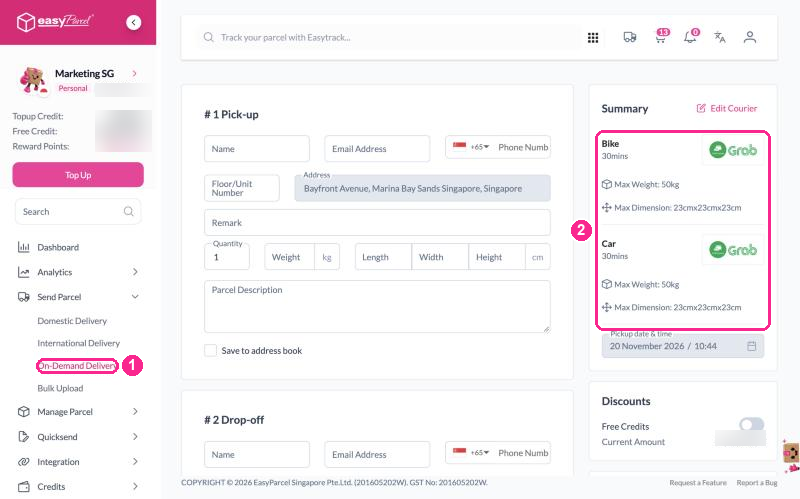
- On the booking page, the Summary (2) lists every courier option you picked. Fill in the pick-up and drop-off details.
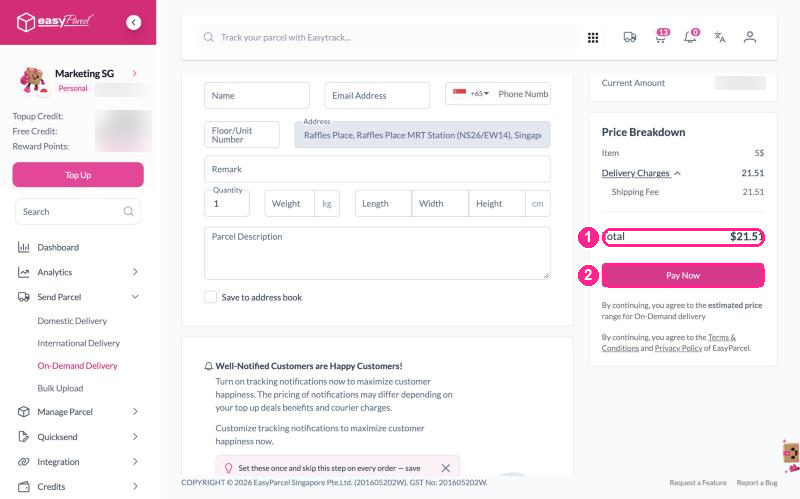
- The Total (1) is the price of your most expensive option. Click Pay Now (2).
See also How do I book an On-Demand delivery?
After you click Pay Now, a Finding you a driver window opens. Your job is sent to every courier option you chose at once. The first courier to accept gets the job, and the others are cancelled.
Each option shows one of these states:
- Searching: still waiting for that courier to accept.
- Accepted: this courier took the job. You see Driver found!
- Cancelled: another courier accepted first, so this option was cancelled.
- No driver: this courier did not accept.
About the payment: the price of your most expensive option is put on hold. If a cheaper courier accepts, the difference goes back to your EasyParcel account.
Want a driver faster? Add a priority fee:
- While we are still looking for a driver, you can click Add priority fee to make your job more attractive to drivers.
- Pick an amount or choose Custom (whole amounts only).
- You only pay the extra amount plus tax, from your EasyParcel credit.
- The fee can be raised but not lowered. It is refunded if the order is cancelled.
If it takes a while:
- Click Keep searching to wait, or Cancel order to stop. Closing the window does not cancel the order. To cancel later, see How do I cancel an On-Demand order?.
- If it takes longer than usual, you see Still looking for a driver. You do not need to keep the page open. Your order list updates when a driver accepts.
- If no courier accepts, you see No courier accepted. The booking is cancelled and your payment goes back to your account.
Statuses
| Status | What it means | What to do |
|---|---|---|
| Fulfilled | The parcel has been delivered. | Nothing. Open the order to see the delivery time. |
| Cancelled by Customer | You cancelled the order. | Your payment goes back to your EasyParcel credit. Book again if you still need to send it. |
Click On-demand Delivery (1) in the left menu. The Status (2) column shows each order's status. Click the arrow (3) to open an order.
The order timeline
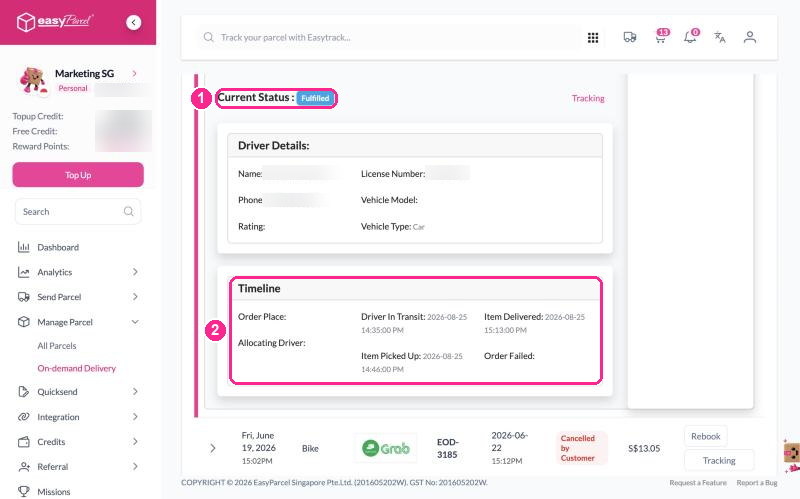
Click the arrow on an order to open it. Current Status (1) shows where it is, and the Timeline (2) shows each step with the time it happened:
- Order Place: you paid and the order was created.
- Allocating Driver: we are finding a driver.
- Driver In Transit: a driver accepted and is on the way to pick up.
- Item Picked Up: the driver has your parcel.
- Item Delivered: the parcel reached the drop-off.
- Order Failed: the delivery could not be completed. See What if my On-Demand delivery failed or was returned?
You can also click Tracking to follow the driver. See How do I track my On-Demand order?
What's next?
Still need help?
Our team is happy to help. ? Live Chat | ✉️ Contact Us