
Quick Summary
An On-Demand parcel can be returned to you, or a delivery can fail, for example when the receiver cannot be reached. Check the order status and contact our support team to arrange the next step.
We'll Cover:
Why a delivery fails?
Common reasons an On-Demand delivery fails or comes back to you:
- The receiver cannot be reached: they do not answer the phone, or nobody is at the drop-off.
- The address is wrong or incomplete: for example a missing unit number, or the map pin is in the wrong place.
- The parcel does not fit the vehicle: it is over the weight or size limit for the transport type you chose, for example a bike.
- The item cannot be sent: it is a prohibited item, or it is not packed safely. See What can and can't I ship?
- The drop-off is in a restricted area: for example Changi Airport, army camps, Jurong Island or offshore islands, which some services cannot deliver to.
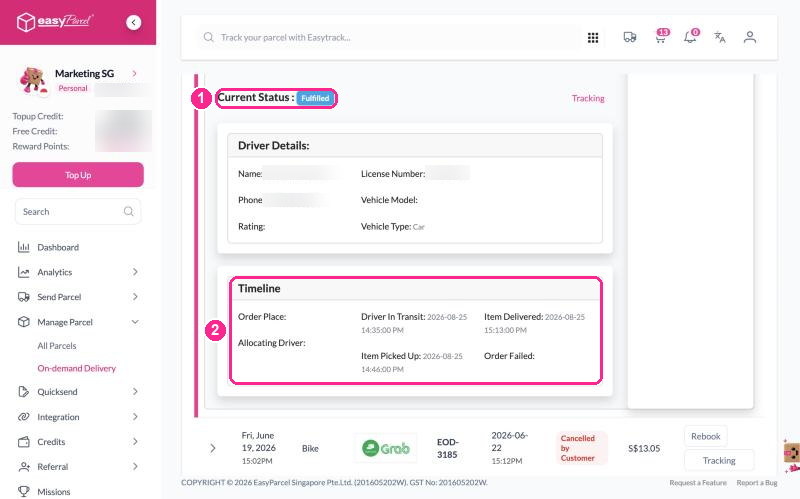
Open the order. Current Status (1) and the Timeline (2) show each step, including Order Failed.
What to do?
- Check the order: open it in Manage Parcel > On-demand Delivery. The Timeline shows Order Failed if the delivery did not go through.
- Contact the driver if the parcel is still with them. See How do I contact my On-Demand driver?
- Contact our support team with your Booking ID to arrange the return or the next step. Go to Contact Us > Shipment Enquiry > Report > Parcel Delivery - late delivery / delivery issue, or use Live Chat.
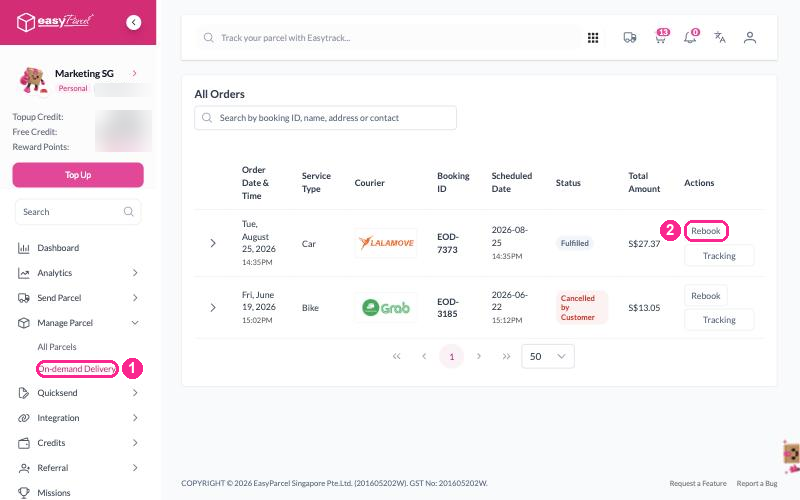
- Send it again: click Rebook on the order. Check the drop-off address, unit number, map pin, receiver phone number and transport type before you pay. A rebooked order is a new order with a new delivery fee.
A failed or returned delivery may have an extra charge from the courier, for example for the return trip or waiting time.
Click On-demand Delivery (1), then Rebook (2) on the order to book it again.
In the app
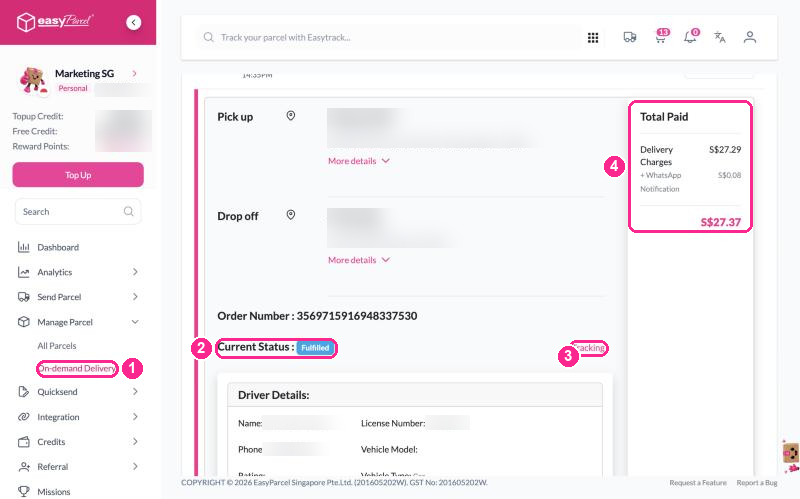
Check the status in Manage Parcel > On-demand Delivery.
Click On-demand Delivery (1) and open the order to see its Current Status (2).
Still need help?
Our team is happy to help. ? Live Chat | ✉️ Contact Us