
Quick Summary
Tracking notifications send your receiver updates as the parcel moves, by email, SMS or WhatsApp. Tick them on the booking page for one parcel, or set them as your default in Account Settings. The price is shown beside each option.
We'll Cover:
- What are tracking notifications?
- Email, SMS or WhatsApp?
- How do I add them when I book?
- How do I turn them on for every order?
What are tracking notifications?
They are messages EasyParcel sends to your receiver, not to you, so they know where their parcel is. Fewer "where is my parcel?" questions for you, and happier customers.
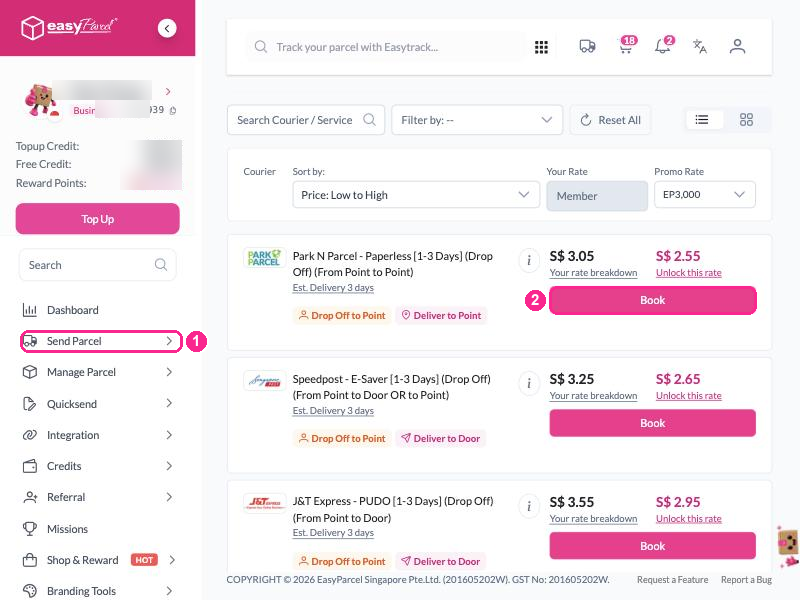
To find them, click Send Parcel (1), get a quote and click Book (2) on a courier.
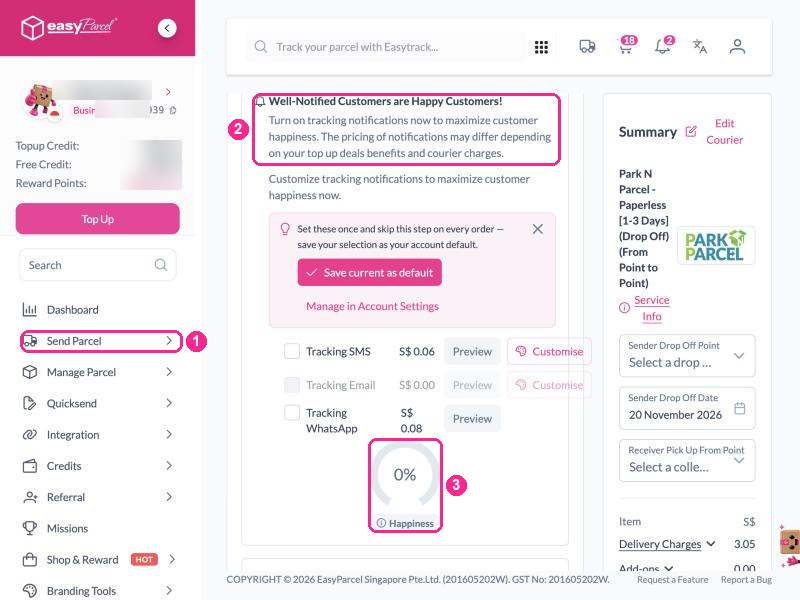
On the booking page, scroll down to Well-Notified Customers are Happy Customers! (2). The Happiness (3) meter goes up as you add more notifications.
Email, SMS or WhatsApp?
- Tracking Email: sent to the receiver's email address. You can add your own brand. See How do I set up a branded Tracking Email?
- Tracking SMS: sent to the receiver's phone number. Works on any phone. You can change the text. See How do I customise Tracking SMS for my receivers?
- Tracking WhatsApp: sent to the receiver's WhatsApp. See What is Tracking WhatsApp?
You can pick one, two or all three. Make sure the receiver's email and phone number are filled in. The price of each one shows beside it on the booking page.
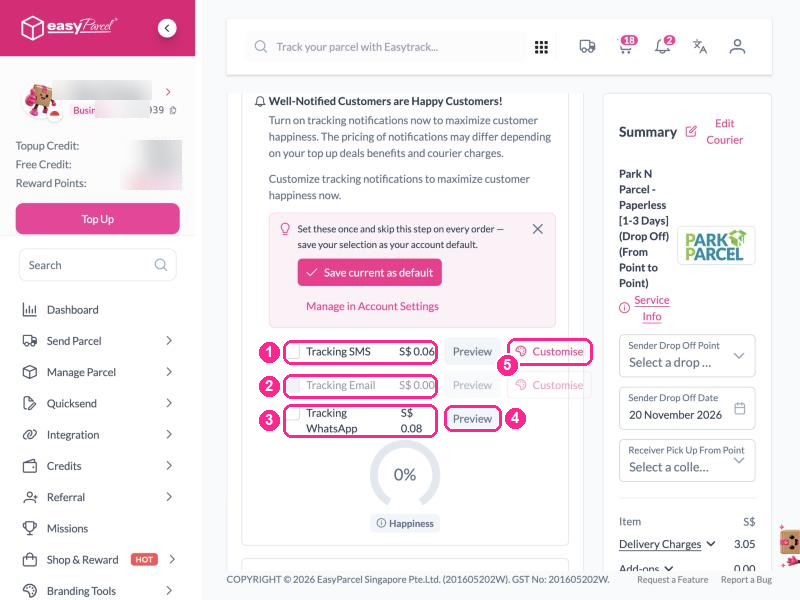
On the booking page they are listed as Tracking SMS (1), Tracking Email (2) and Tracking WhatsApp (3).
How do I add them when I book?
- Click Send Parcel, get a quote and click Book on a courier.
- On the booking page, scroll down to the tracking notifications section.
- Tick Tracking SMS (1), Tracking Email (2) or Tracking WhatsApp (3). The price shows beside each one.
- Click Preview (4) to see the message, or Customise (5) to change it.
Already in your cart? You can still change them before you pay. See How do I change the courier, pick-up date or add-ons before I pay?
How do I turn them on for every order?
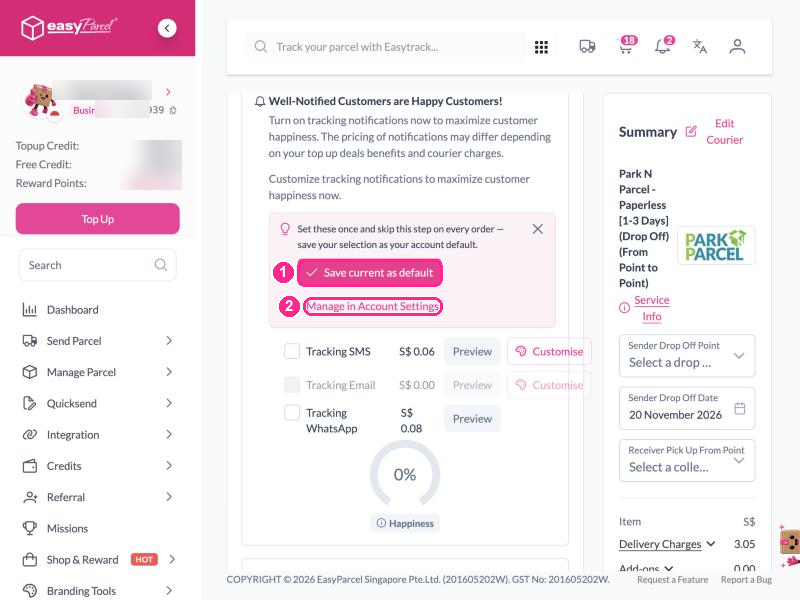
From the booking page: in the tracking notifications section, click Save current as default (1) to keep your choice for future orders, or Manage in Account Settings (2).
From Account Settings:
- In the left menu, click Settings (1) > Account Settings.
- Scroll down to Buyer tracking notifications (2).
- Turn on Email (3), SMS (4) or WhatsApp (5).
- Click Save changes (6).
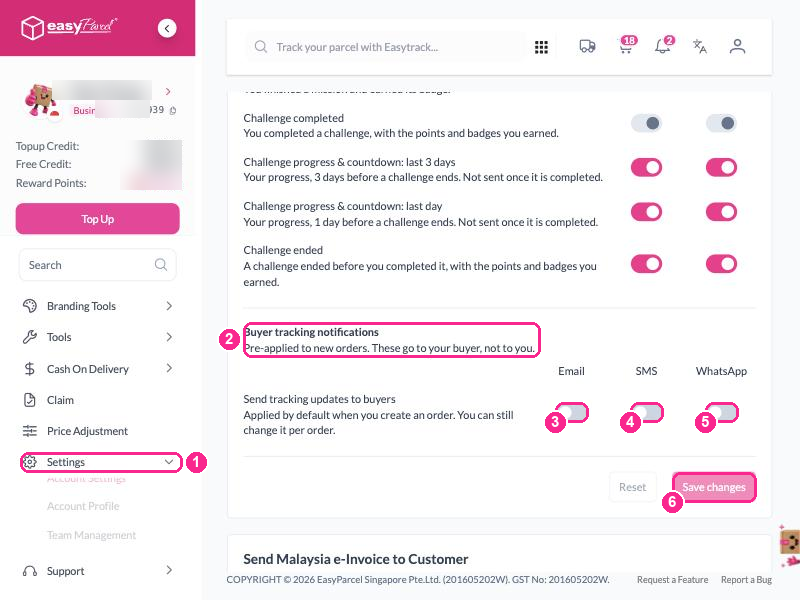
They are then ticked for every new order. You can still change them per order.
What's next?
Still need help?
Our team is happy to help. ? Live Chat | ✉️ Contact Us