
Quick Summary
AWB branding puts your brand banner or text on every shipping label (air waybill). Set it up under Branding Tools > AWB Branding, then switch it on automatically for new orders in Settings > Account Settings.
We'll Cover:
Create your banner or text
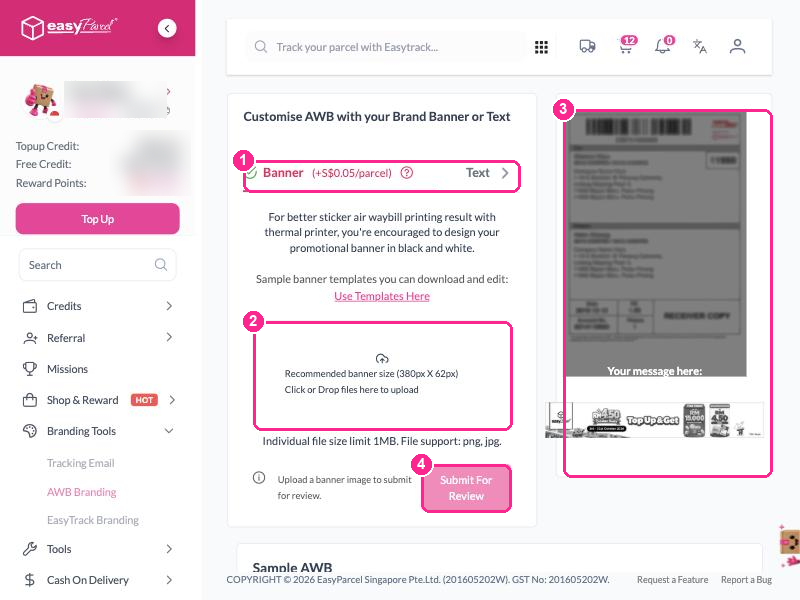
Choose Banner or Text (1). The page shows the price per parcel for each option.
- Banner – upload an image (2). The recommended size is 380px x 62px. The file must be a png or jpg of up to 1MB. For thermal printers, a black and white banner prints best
- Text – type your message
Check the sample label (3), then click Submit For Review (4).
Turn it on for new orders
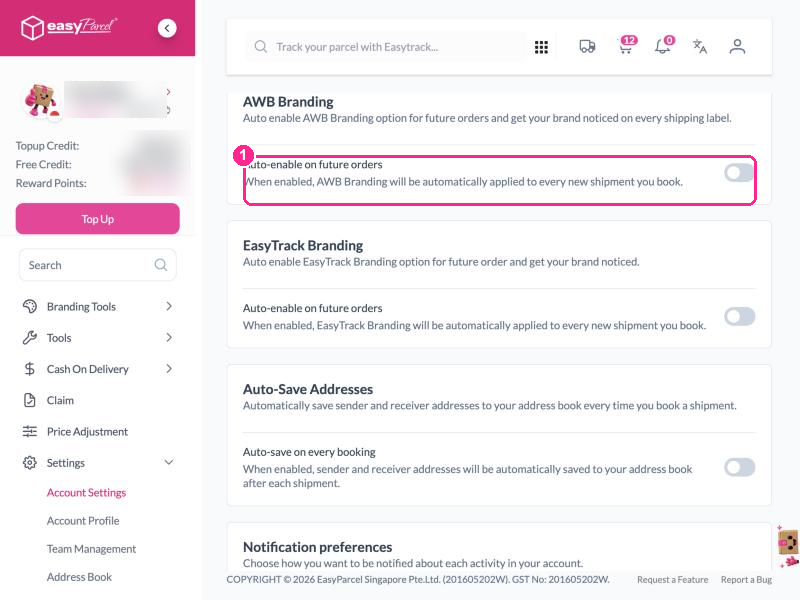
Go to Settings > Account Settings and switch on Auto-enable on future orders (1) under AWB Branding. EasyTrack Branding has a similar setting for your tracking page.
Note: Your banner or text is reviewed before it is used.
Still need help?
Our team is happy to help. ? Live Chat | ✉️ Contact Us