
Quick Summary
When your COD shows Ready for Withdrawal, open Cash On Delivery > COD Shipment Listing and click Withdraw. Follow your payout under COD Payout Listing.
We'll Cover:
How to withdraw?
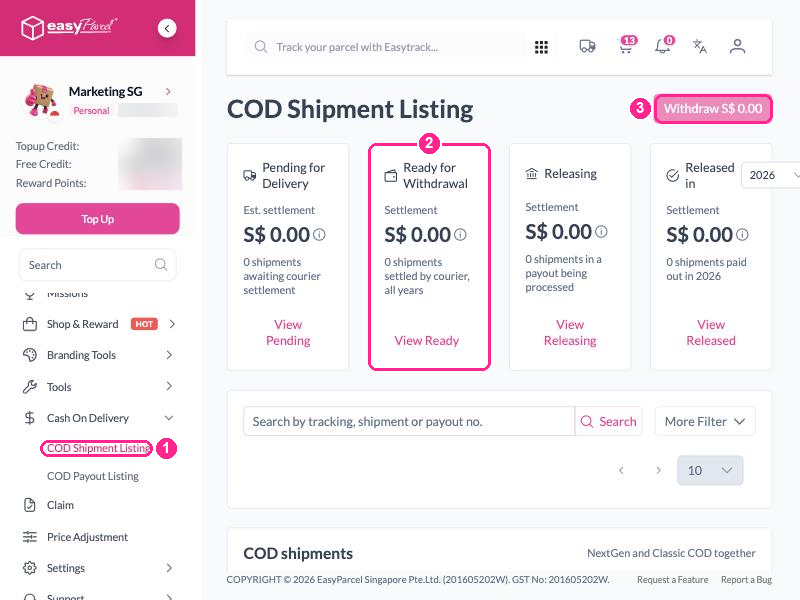
- Go to Cash On Delivery > COD Shipment Listing.
- Check the amount under Ready for Withdrawal.
- Click Withdraw. The button shows the amount.
In COD Shipment Listing (1), the Ready for Withdrawal (2) box shows the money you can withdraw. Click Withdraw (3) to start.
You may be asked to verify your identity and confirm your bank details before you can withdraw.
How to follow your payout?
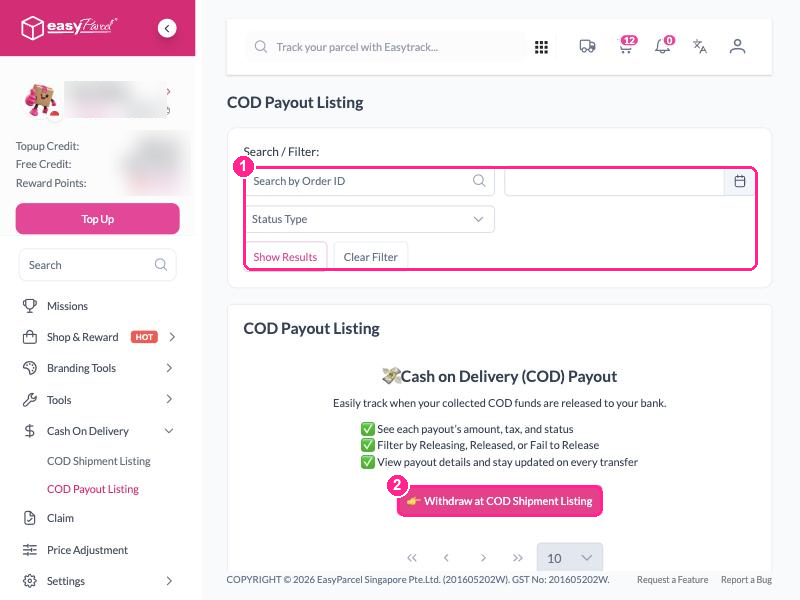
Open Cash On Delivery > COD Payout Listing. Search by order ID or pick a status type (1), for example Releasing, Released or Fail to Release. You can see each payout's amount, tax and status. Click Withdraw at COD Shipment Listing (2) to go back and withdraw.
Note: You can withdraw only amounts that the courier has already settled.
Prefer a video? Watch How to Withdraw COD Payout in Support > Video Tutorial.
What's next?
Still need help?
Our team is happy to help. ? Live Chat | ✉️ Contact Us