
Quick Summary
See your COD payouts in COD Payout Listing, and download statements from Transaction Statements.
We'll Cover:
See your COD payouts
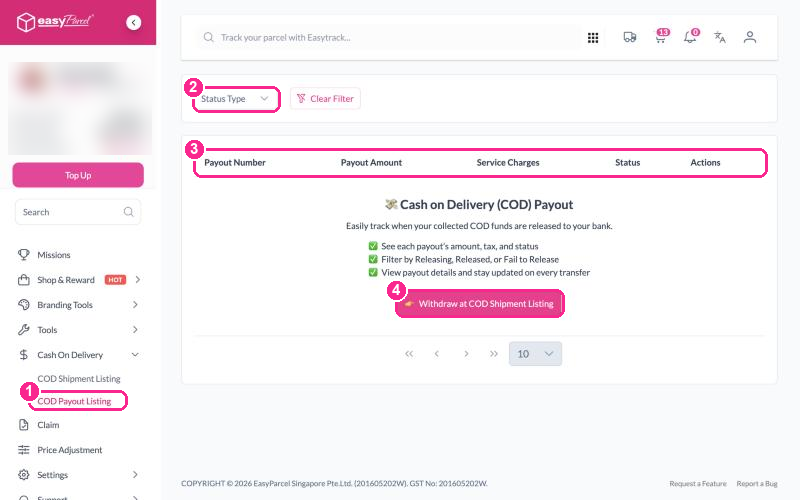
- Click Cash On Delivery > COD Payout Listing (1).
- Use Status Type (2) to filter by Releasing, Released or Fail to Release.
- The table (3) shows each payout's number, amount, service charges and status. Use Actions to view the payout details.
- To withdraw COD money, click Withdraw at COD Shipment Listing (4).
Download statements
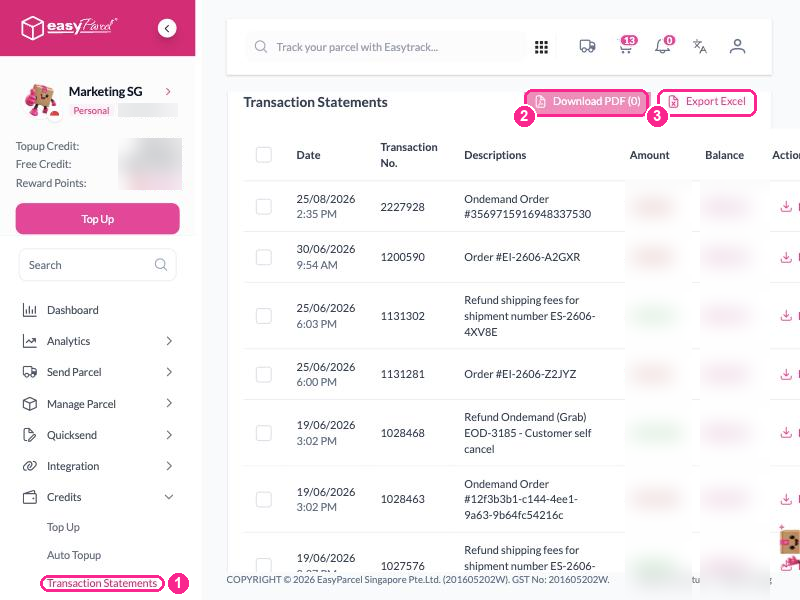
Go to Credits > Transaction Statements to download your statements as PDF or Excel. See How do I see my transactions and statements?
Click Credits > Transaction Statements (1). Tick the rows you need, then click Download PDF (2) or Export Excel (3).
Still need help?
Our team is happy to help. ? Live Chat | ✉️ Contact Us