
Quick Summary
Auto Top Up adds credit for you when your balance falls below a limit you set. Open Credits > Auto Topup and turn it on.
We'll Cover:
- How it works?
- Turn it on
- How Auto Top Up works
- Good to know
- Related articles
How it works?
- You choose a top-up package and a threshold
- When your top-up credit falls below the threshold, the system charges the package amount to your card
- You get that package's benefits and an email after each auto top-up
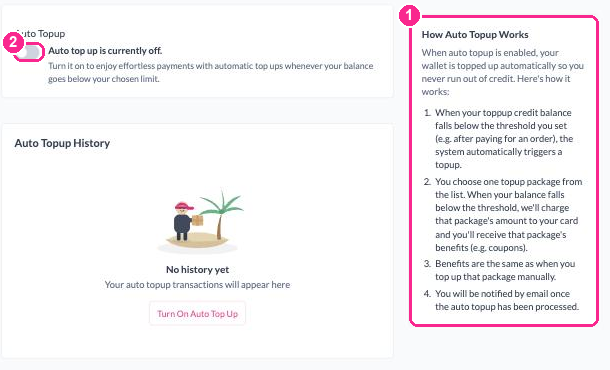
Read How Auto Topup Works (1) on the Auto Topup page. Use the switch (2) to turn it on.
Turn it on
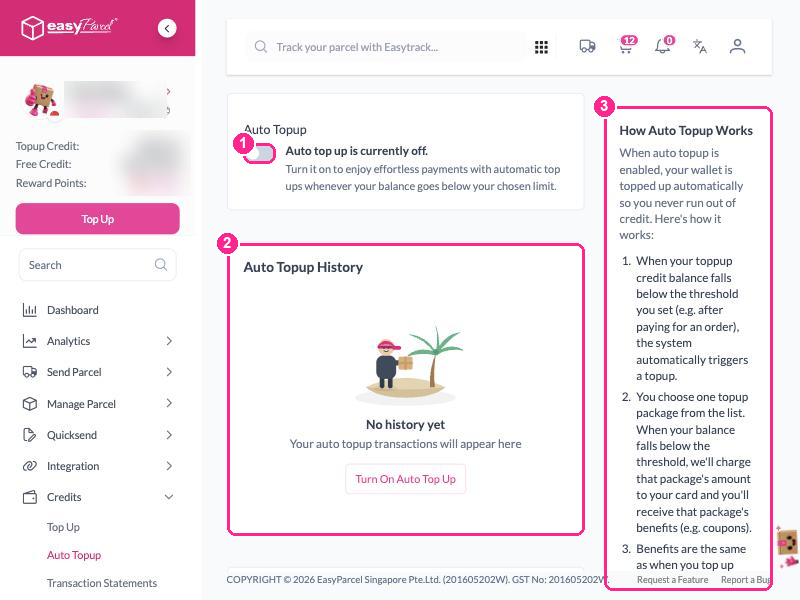
Open Auto Topup. Use the switch (1) or Turn On Auto Top Up. Your Auto Topup History (2) shows each top-up. How Auto Topup Works (3) explains the steps.
How Auto Top Up works
- You set a limit. When your top-up credit falls below it (for example after you pay for an order), a top-up starts automatically.
- You choose one top-up package from the list.
- The amount of that package is charged to your card, and you get the same benefits as a normal top-up of that package, for example coupons.
- You are told by email or notification when an auto top-up has been processed.
Good to know
- Auto Top Up is off until you turn it on. Until then the page says "Auto top up is currently off".
- The page has Terms & Conditions you can read before you turn it on.
- Auto Topup History stays empty ("No history yet") until the first automatic top-up happens.
Related articles
What's next?
Still need help?
Our team is happy to help. ? Live Chat | ✉️ Contact Us