
Quick Summary
You pay for shipments with your EasyParcel credit at checkout. If you don't have enough credit, top up first.
We'll Cover:
Pay at checkout
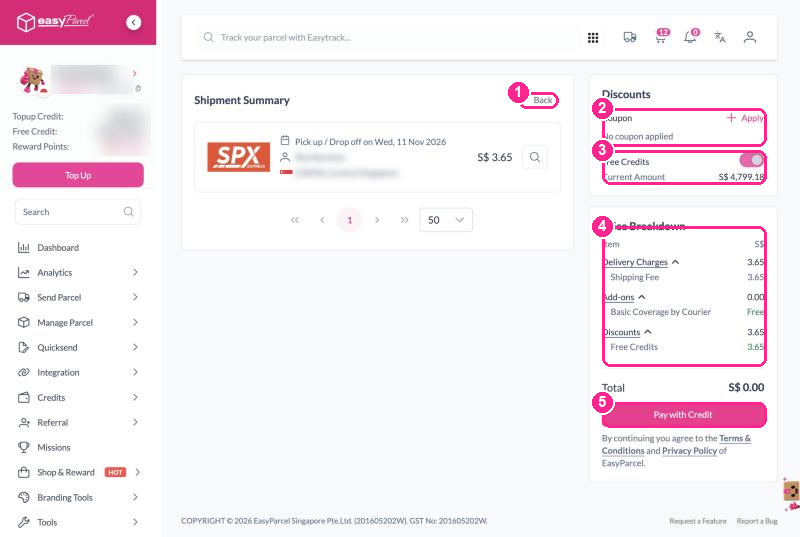
- Book your parcel and go to checkout.
- Turn on Free Credits if you want to use them.
- Click Pay with Credit.
Not enough credit?
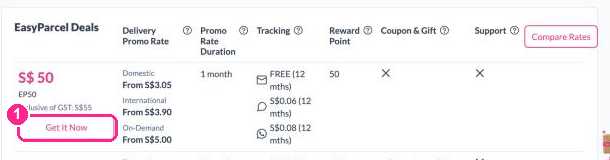
- Click Top Up and choose a deal.
- Pay online with PayNow, GrabPay or a debit/credit card. Credit is added straight away.
- Or pay by bank transfer. See How do I top up by bank transfer?
Click Get It Now (1) on a deal.
Pay later
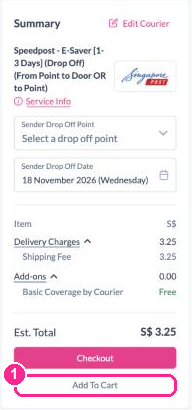
Click Add To Cart to save parcels and pay later. See What is the cart and how do I pay for my parcels later?
Click Add To Cart (1) on the booking page.
Can I pay without credit?
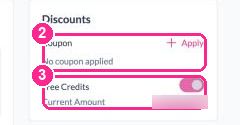
No. Shipments are paid with your EasyParcel credit at checkout. If your balance is not enough, top up first with PayNow, a card or an e-wallet, then come back and pay. You can also use Free Credits with the switch at checkout.
At checkout, use Free Credits (3) with the switch.
What's next?
Still need help?
Our team is happy to help. ? Live Chat | ✉️ Contact Us