
Quick Summary
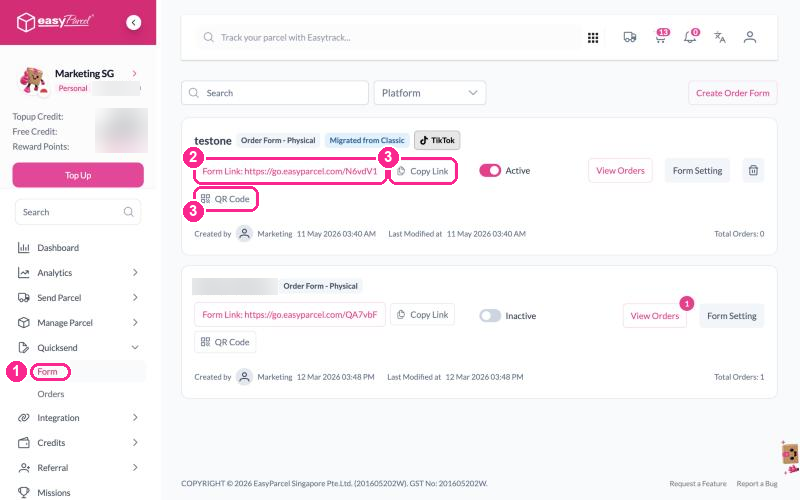
Each form has a link and a QR code. In Quicksend > Form, click Copy Link or QR Code and share it with your customers. Use the switch to make a form Active or Inactive.
We'll Cover:
Share your form
Each form shows its Form Link (2). Click Copy Link (3) to paste it in your chats or posts, or QR Code (3) to get a code customers can scan. Customers can only order from an active form.
Manage your forms
- Create Order Form (1) to make a new one
- The switch (4) turns a form on or off
- View Orders (5) shows its orders and the number of new orders
- Form Setting (6) edits the form
- The bin icon (7) deletes the form
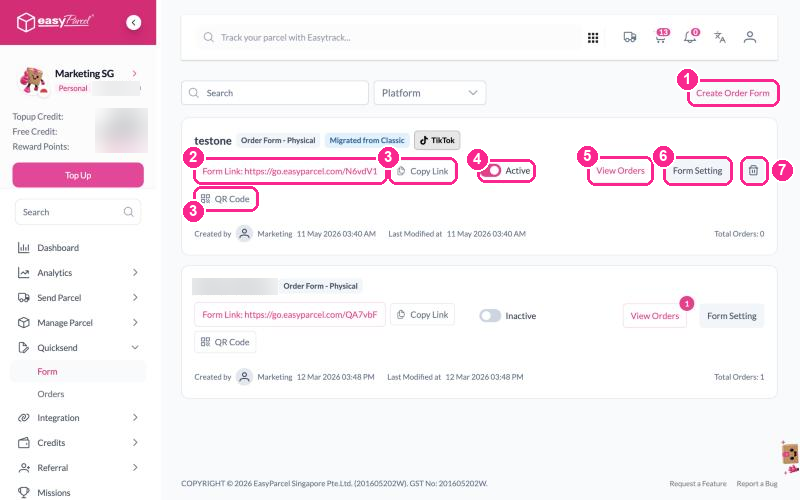
A form that was moved from the old EasyParcel shows a Migrated from Classic tag.
Still need help?
Our team is happy to help. ? Live Chat | ✉️ Contact Us