
Quick Summary
See your orders in Quicksend > Orders. Filter by date, platform or shop, and use the tabs New, Pending Checkout and Deleted. Check the proof of payment, then ship the order.
We'll Cover:
The Orders page
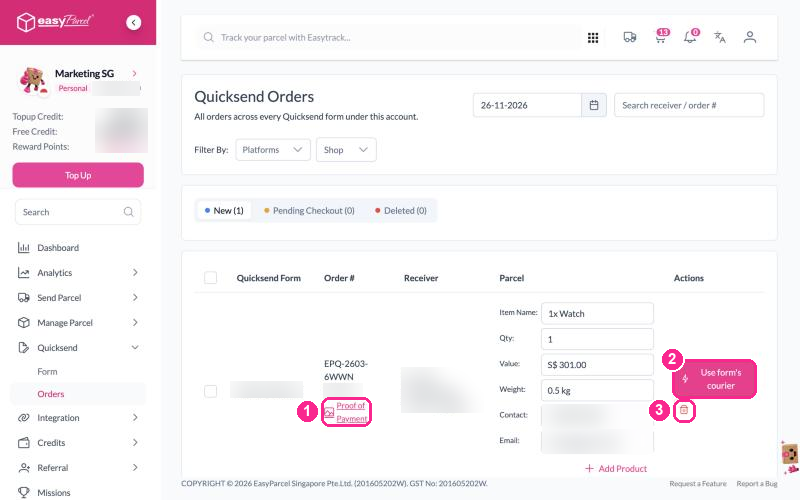
Each order shows its form, order number, receiver and the parcel details: item name, quantity, value, weight, contact and email.
- Proof of Payment (1): shown when a customer uploaded a receipt, so you can check it. See How do I check a customer's proof of payment in Quicksend?
- Use form's courier (2): book the parcel with the courier set in the form.
- Delete (3): remove the order.
In the app
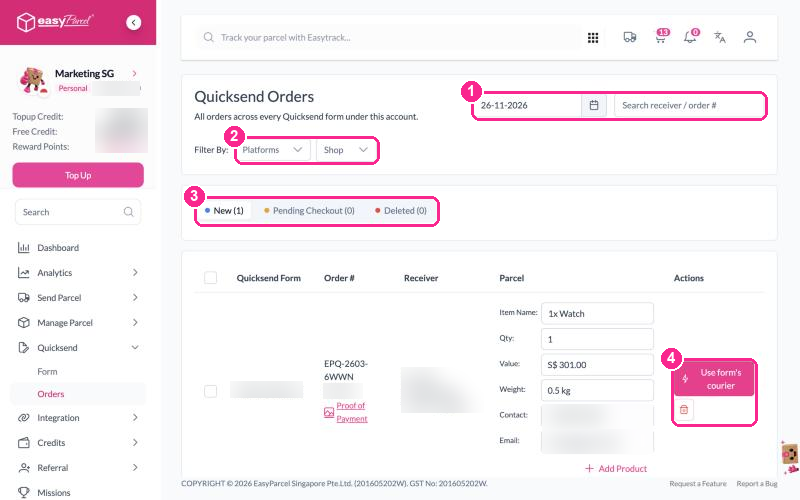
Open Quicksend > Orders. Pick a date or search (1), filter by platform or shop (2), and use the tabs New, Pending Checkout and Deleted (3). Use the Actions (4) buttons to ship an order.
What's next?
Still need help?
Our team is happy to help. ? Live Chat | ✉️ Contact Us