
Quick Summary
To change the language, click the language icon on the top bar and choose your preferred language. EasyParcel supports English, Simplified Chinese, Traditional Chinese, Bahasa Melayu (Malaysia), Bahasa Melayu (Brunei), Bahasa Indonesia and Thai.
We'll Cover:
How to change the language?
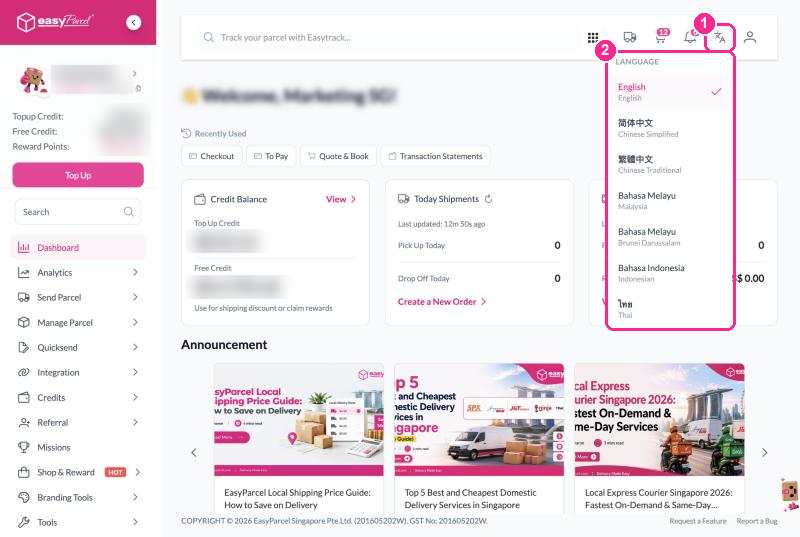
Step 1: Click the language icon (1) on the top bar, next to the bell icon.
Step 2: Choose your language from the list (2). The page switches to the language you picked.
Supported languages
- English
- 简体中文 (Chinese Simplified)
- 繁體中文 (Chinese Traditional)
- Bahasa Melayu (Malaysia)
- Bahasa Melayu (Brunei Darussalam)
- Bahasa Indonesia
- ไทย (Thai)
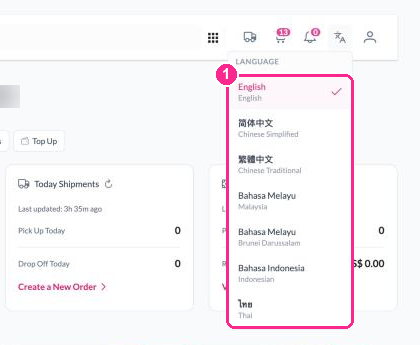
Click the language icon on the top bar to see this list (1).
Still need help?
Our team is happy to help. ? Live Chat | ✉️ Contact Us