
Quick Summary
Use Report when something is wrong with a parcel, for example a missed pick-up, a late delivery or an extra charge. Go to Manage Parcel > All Parcels, click More Action on the parcel and choose Report. Then choose the topic that matches your problem.
We'll Cover:
Open Report
- Go to Manage Parcel > All Parcels.
- Click More Action on the parcel row.
- Choose Report (1). The Select your enquiry window opens.
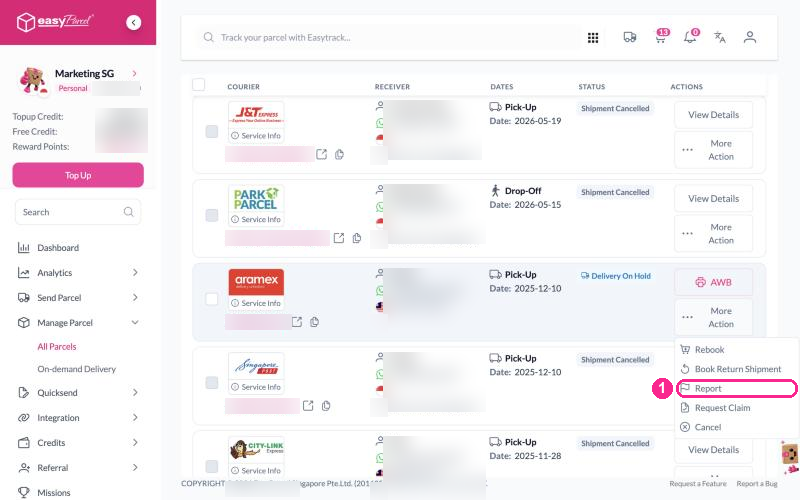
Report topics
On the Report tab (1), the topics (2) are:
- Parcel Collection – missed pick-up or remind pick-up
- Parcel Delivery – late delivery or a delivery issue
- Request Proof Of Delivery (POD) – the parcel shows delivered but the receiver has not received it
- Parcel Cancellation
- Weight Discrepancy – an extra charge for a weight or size difference found after collection
- Other Price Adjustment (Surcharge) – an extra charge that is not weight-related
- Shipment Modification (3) – a change to a booked shipment, such as the receiver's address or contact number. Our team will follow up
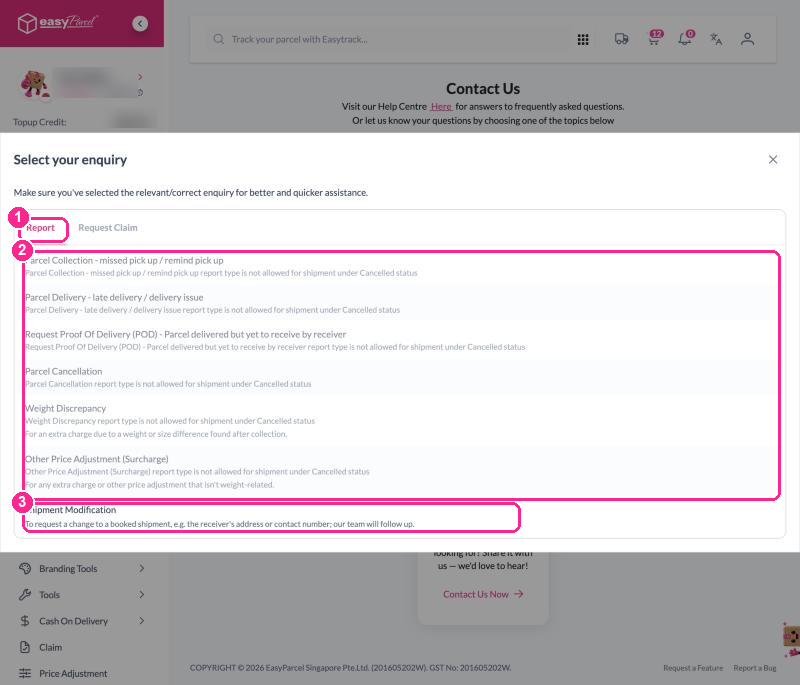
Note: A topic that is not allowed for your parcel's status is greyed out and tells you why. For example, most topics are not allowed for a cancelled shipment. To request compensation for a lost or damaged parcel, see How do I request a claim for a lost or damaged parcel?
What's next?
Still need help?
Our team is happy to help. ? Live Chat | ✉️ Contact Us