
Quick Summary
Each courier service has its own maximum weight and size. Open Service Info (the i icon) on the quote page to see the limits for the service you choose. A parcel over the limit cannot be booked or may be charged extra.
As of November 2026. Courier rules change, so always check Service Info for your service.
We'll Cover:
- Limits by courier service (domestic)
- Limits by courier service (international)
- How to check your service?
Limits by courier service (domestic)
These are the limits shown in Service Info for every domestic service (Singapore to Singapore), as of November 2026.
| Courier service | Maximum weight | Maximum size |
|---|---|---|
| Park N Parcel - Paperless [1-3 Days] (drop-off or pick-up) | 8 kg | Length + width + height up to 100 cm |
| Speedpost - E-Saver [1-3 Days] (drop-off) | 30 kg | Depends on the drop-off point: POPDrop 32.4 x 22.9 x 6.5 cm, POPStation 42 x 37 x 61 cm, POPStop no side over 150 cm and length + 2 x width + 2 x height up to 300 cm |
| Speedpost - Economy [1-3 Days] (pick-up) | 30 kg | No side over 150 cm, length + 2 x width + 2 x height up to 300 cm (drop-off point sizes as above) |
| Speedpost - Standard [1-2 Days] | 30 kg | Pick-up: no side over 150 cm, length + 2 x width + 2 x height up to 300 cm. Drop-off: depends on the drop-off point |
| Speedpost - Priority [Same-Day] | 30 kg | No side over 150 cm, length + 2 x width + 2 x height up to 300 cm |
| J&T Express - PUDO [1-3 Days] | 30 kg | Length + width + height up to 240 cm, longest side up to 80 cm |
| J&T Express - DOM / DOM Paperless [1-3 Days] | 30 kg | Length + width + height up to 240 cm, longest side up to 80 cm |
| J&T Express - Next-Day Priority [1-2 Days] | 30 kg | Length + width + height up to 240 cm, longest side up to 80 cm |
| J&T Express - Next-Day Guaranteed [1 Day] | 30 kg | Length + width + height up to 300 cm |
| SPX Express [1-3 Days] | 30 kg | No side over 180 cm |
| Ninja - Collect [1-3 Days] (drop-off) | 4 kg | Length + width + height up to 80 cm |
| Ninja - Standard [1-3 Days] | Not stated | Not stated |
| Ninja - Express [1 Day] | 30 kg | Length + width + height up to 300 cm |
| TracX Logis [1-3 Days] | 30 kg | No side over 150 cm, length + width + height under 300 cm. Size surcharge above 120 cm |
| GoodieGift - Paperless [1-3 Days] | 10 kg | Not stated in Service Info |
| Janio [1-3 Days] | 30 kg | Length + width + height up to 100 cm |
| Aramex [1-3 Days] | 30 kg | Up to 120 cm. Oversize surcharges apply |
| SF Express [1-2 Days] | 25 kg | 200 x 80 x 70 cm |
| uParcel - On-Demand (1 Hour Rush, 3 Hours Express, Same-Day, Next-Day) | 25 kg | Length + width + height up to 200 cm |
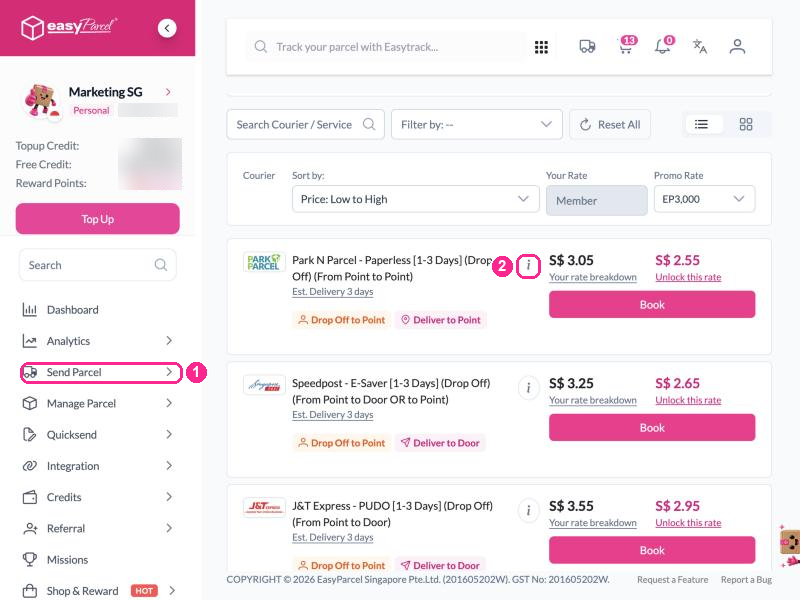
Click Send Parcel (1), get a quote, then click the i (2) button next to a service to open its Service Info.
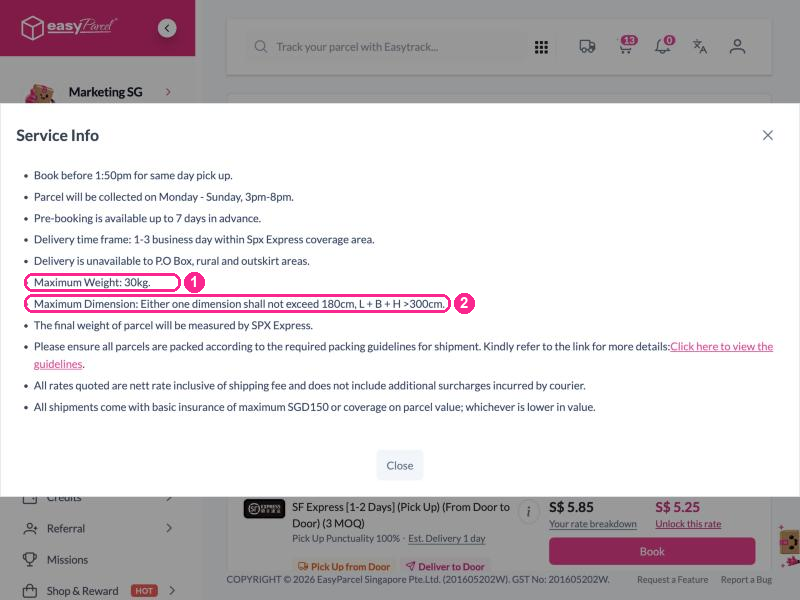
For example, SPX Express shows its Maximum Weight (1) and Maximum Dimension (2) in Service Info.
Limits by courier service (international)
International couriers depend on where you send to. These are the services and limits shown for Singapore to Malaysia, as of November 2026. Other countries may show different couriers, so always check Service Info for your destination.
| Courier service | Maximum weight | Maximum size |
|---|---|---|
| City-Link Express [1-3 Days] | 30 kg | Not stated in Service Info |
| SF Express - Ecommerce / Standard | 30 kg | 200 x 80 x 70 cm |
| Teleport - Pink | Not stated in Service Info | Longest side up to 100 cm, total length up to 130 cm |
| TracX Logis - International | 30 kg | No side over 150 cm, length + width + height under 300 cm |
| Aramex - Economy (EPX) / Priority (PPX) | 30 kg | 100 x 50 x 50 cm |
| Janio - International | 30 kg | 160 x 120 x 100 cm |
| Ninja - International Standard | Not stated | Not stated |
| Airpak - E-Parcel | 30 kg | Not stated in Service Info |
| UPS - Expedited / Saver | 70 kg per package | Longest side up to 274 cm, length + 2 x width + 2 x height up to 400 cm. Handling fee above 25 kg |
| FedEx - International Economy / Priority | 68 kg | Length + 2 x width + 2 x height up to 330 cm. Surcharge above these limits |
| FedEx - International Connect Plus | 70 kg | Longest side up to 274 cm, length + girth up to 330 cm |
| Speedpost - International Priority / Express | 30 kg | No side over 105 cm, length + width + height up to 200 cm |
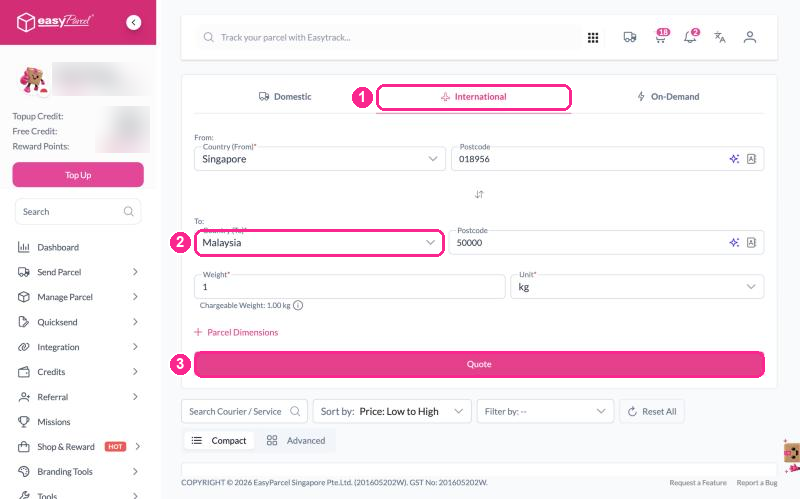
How to see the international services: click the International (1) tab, choose the destination in Country (To) (2), enter the postcodes and weight, then click Quote (3).
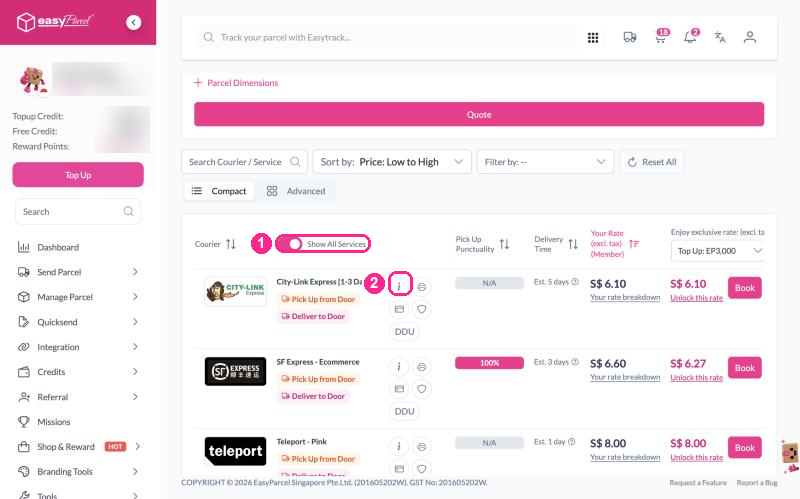
In the results, keep Show All Services (1) on to see every service, then click the i (2) button next to a service to open its Service Info.
How to check your service?
Get a quote, then click the i icon beside the courier service. Service Info lists the maximum weight and size, pick-up rules and basic coverage for that service.
Note: Other services from the same courier can have different limits. Always check Service Info for the one you choose.
Click Send Parcel (1), get a quote, then click the i (2) button next to a service to open its Service Info.
What's next?
Still need help?
Our team is happy to help. ? Live Chat | ✉️ Contact Us