
Quick Summary
Some parcels have surcharges on top of the shipping rate, such as a residential address charge, an oversize charge or a location charge. You can check them before you book (Service Info and the rate breakdown on the quote results), after you book (parcel details) and after collection (Price Adjustment).
As of November 2026. Courier rules change, so always check Service Info for your service.
We'll Cover:
Common surcharges
- Residential address: an extra fee couriers can charge for deliveries to homes
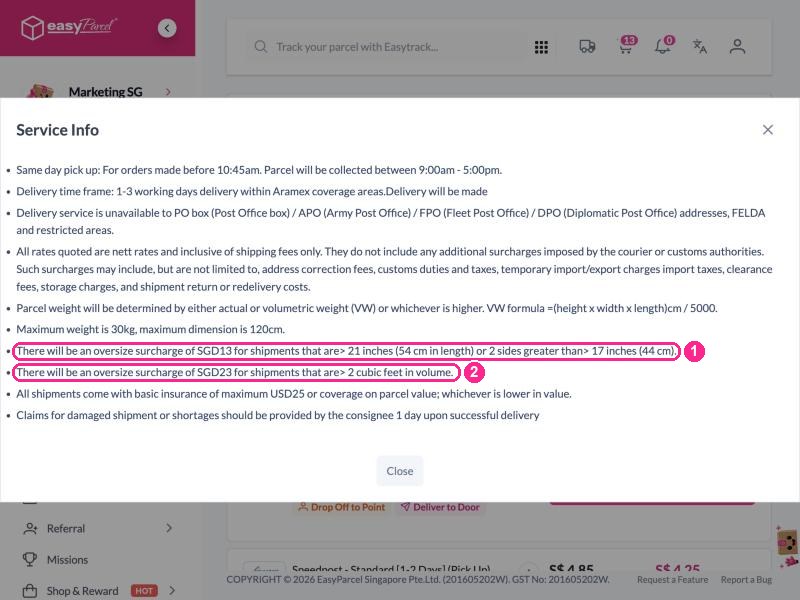
- Oversize or overweight: for parcels over a courier's standard size or weight. For example, Aramex lists oversize charges of S$13 and S$23 for large parcels, and TracX Logis lists a size charge when length + width + height is over 120 cm
- Minimum pick-up quantity: some services charge S$5 if you have fewer parcels than the minimum, for example Ninja Van and Goodie Gift (5 parcels)
- Location: for example uParcel lists S$2 for pick-up or delivery in the Downtown, Orchard and CBD area and S$4 for the Tuas area
- Customs and duties (international): see What do DDU and DDP mean?
For example, Aramex lists its oversize surcharges (1) and (2) in Service Info.
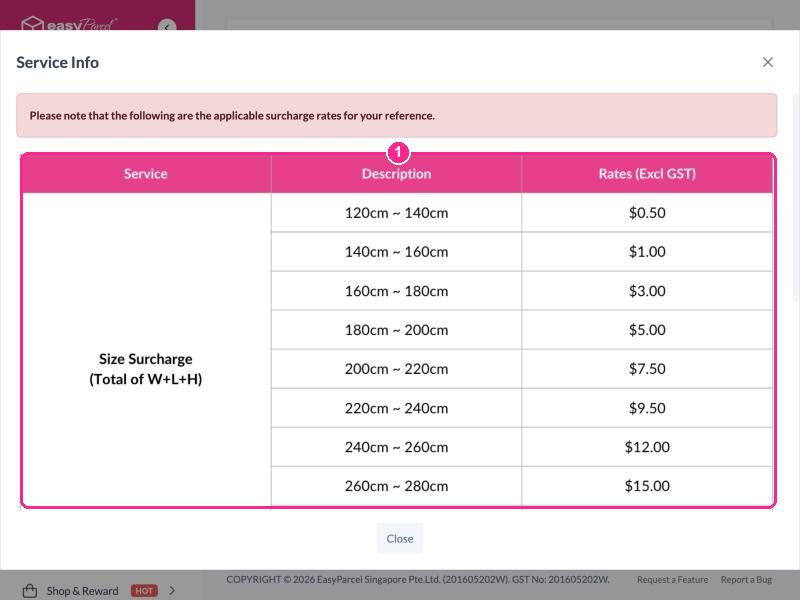
Some couriers show a surcharge table in Service Info, for example the TracX Logis size surcharge (1).
Where to see them?
You can check surcharges at three points: before you book, after you book, and after the courier collects your parcel.
1. Before you book (quote results)
- Click Send Parcel and get a quote. For international parcels, click Your rate breakdown under a courier's price to see what the price is made of, including any surcharges.
- Click the i button next to a service to open its Service Info. It lists the surcharges the courier may add, for example oversize or size charges. Some quoted rates do not include courier surcharges, and Service Info says so.
[Add screenshot: international quote with Your rate breakdown open]
2. After you book (parcel details)
- Go to Manage Parcel > All Parcels, click ⋯ on the parcel and choose View Details.
- The Payment Details tab shows what you paid for the parcel, including any surcharges and add-ons.
[Add screenshot: View Details > Payment Details]
3. After collection (Price Adjustment)
- If the courier finds a difference after collection, for example in weight or size, the extra charge shows under Price Adjustment. See What is a price adjustment and where can I see it?
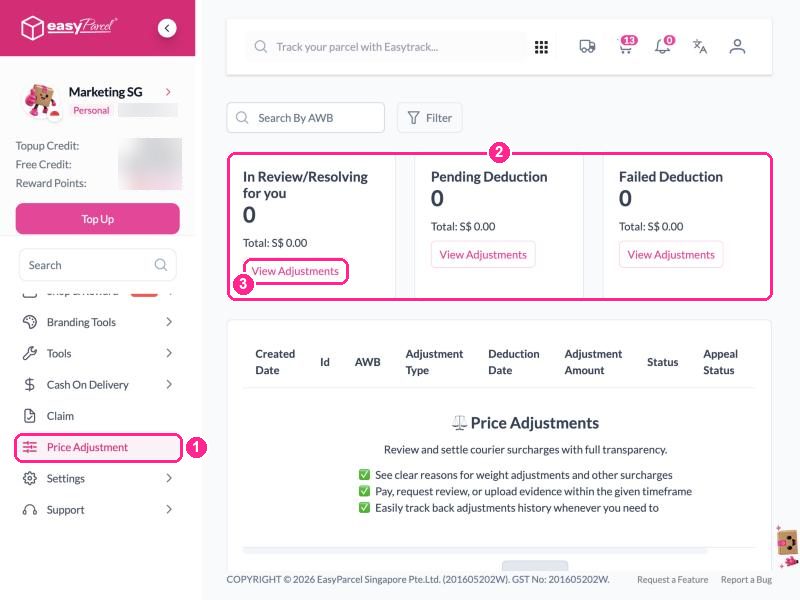
Click Price Adjustment (1) in the left menu. The boxes (2) show adjustments in review, pending and failed. Click View Adjustments (3) to see them.
What's next?
Still need help?
Our team is happy to help. ? Live Chat | ✉️ Contact Us