
Quick Summary
Couriers charge by whichever is higher: your parcel's actual weight or its volumetric weight. Volumetric weight is worked out from the parcel's size: (width x length x height) / 5000. Use the Volumetric Calculator under Tools to check it before you book.
We'll Cover:
What volumetric weight is?
A large, light parcel takes up as much space as a heavy one, so couriers price it by size too. The chargeable weight is the higher of the actual weight and the volumetric weight.
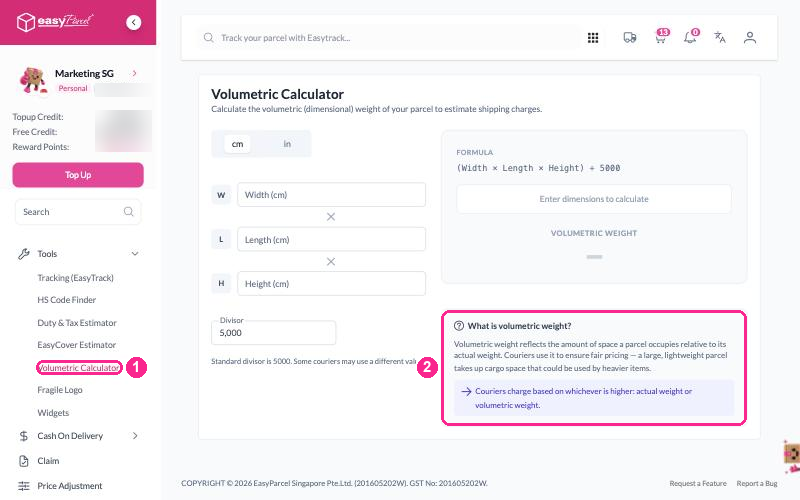
Click Tools > Volumetric Calculator (1). The What is volumetric weight? (2) box on the page explains it too.
How to calculate it?
- Click Tools > Volumetric Calculator (1).
- Choose cm or in.
- Enter the Width (2), Length (3) and Height (4).
- Check the Divisor (5). The standard divisor is 5,000. Some couriers use a different divisor, shown in their Service Info.
- Read the Volumetric Weight (6).
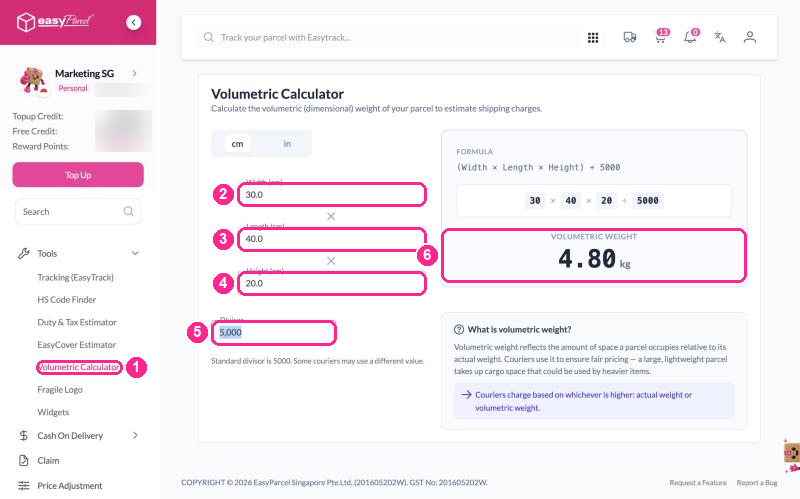
Example: a parcel of 30 x 40 x 20 cm gives (30 x 40 x 20) / 5000 = 4.80 kg. If the parcel weighs 2 kg on the scale, you are charged for 4.80 kg.
How to find your parcel's weight?
Step by step
- Actual weight: weigh the parcel on a scale, with the packaging.
- Volumetric weight: measure the length, width and height in cm and use the Volumetric Calculator under Tools. The divisor is 5,000 for most couriers and 6,000 for some.
- Compare and declare: enter the higher of the two as the parcel weight when you book.
See What is volumetric weight and chargeable weight?
For example, in Tools > Volumetric Calculator (1), a parcel of 30 x 40 x 20 cm gives a Volumetric Weight (6) of 4.80 kg.
What's next?
Still need help?
Our team is happy to help. ? Live Chat | ✉️ Contact Us