
Quick Summary
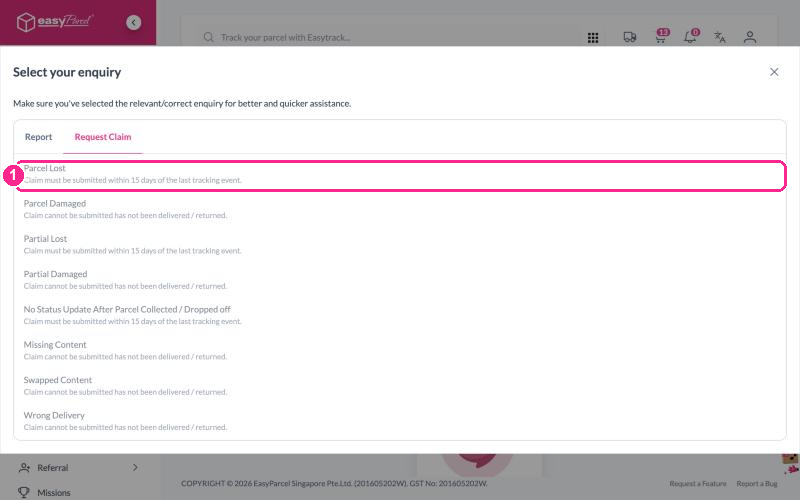
If your parcel is lost, request a claim with the type Parcel Lost. It must be submitted within 15 days of the last tracking event.
We'll Cover:
Before you claim
Keep your invoice, the order details and photos of the parcel and packaging.
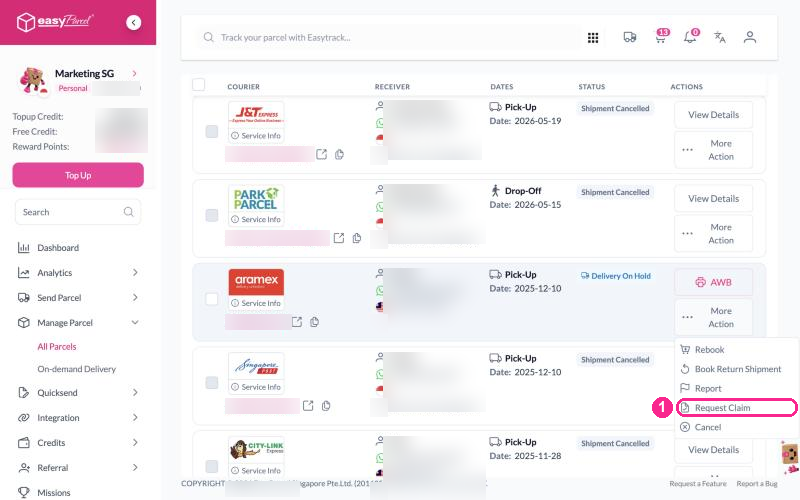
When you are ready, click More Action on the parcel and choose Request Claim (1).
How to claim?
Go to Manage Parcel > All Parcels, click More Action, choose Request Claim and select Parcel Lost (1). See How do I request a claim for a lost or damaged parcel?
In the app
In All Parcels, click the ⋯ button on the parcel and choose Request Claim (1).
What's next?
Still need help?
Our team is happy to help. ? Live Chat | ✉️ Contact Us