
Quick Summary
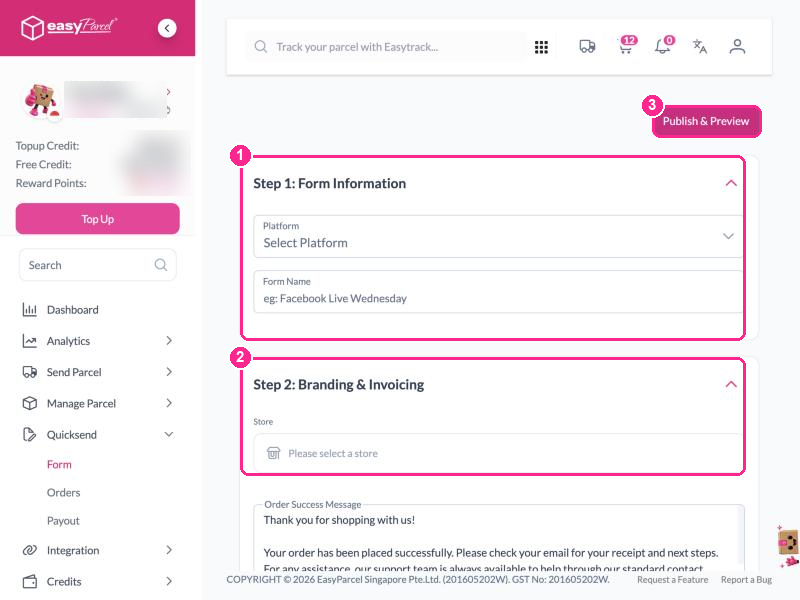
Open Quicksend > Form and click Create Order Form. Fill in the seven steps, then click Publish & Preview.
We'll Cover:
The seven steps
- Form Information: choose the platform and give the form a name, for example Facebook Live Wednesday
- Branding & Invoicing: choose your store and write the message customers see after a successful order
- Product Setup: choose Physical Product, then how buyers choose products. Buyers can describe their own item, with a default item description and HS code for international parcels
- Sender Configuration: enter your pick-up details with Smart Address, Use Default Pick Up Address or Address Book, and choose who pays delivery (for example paid by merchant, you)
- Payment Setup: choose Manual Payment (Offline). Customers see your bank details or QR code and upload proof of payment for you to verify
- Courier Setting: pick the preferred courier and whether to send by pick-up or drop-off. You can enable international shipping with its own courier preference
- Marketing Tools: switch on Air Waybill Branding, Tracking SMS, Tracking Email and Tracking WhatsApp
Still need help?
Our team is happy to help. ? Live Chat | ✉️ Contact Us