
Quick Summary
Webhooks send updates to your server when something changes, so you do not need to keep asking. Add an endpoint URL in the Developer Hub and choose the topics you want.
We'll Cover:
- Subscribe
- Topics
- Delivery and retries
- Check the signature
Subscribe
You need a developer account, an app and a web address on your server that accepts POST requests.
- In the EasyParcel Developer Hub, click Apps and open Settings for your app.
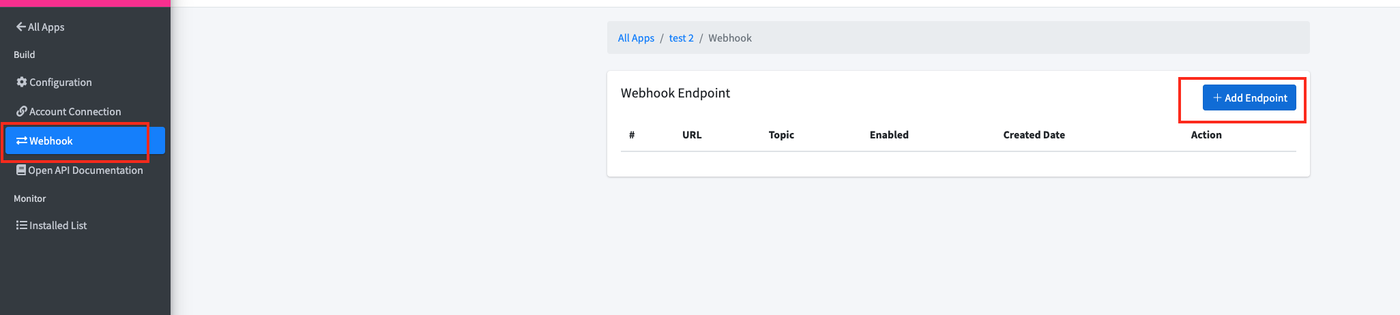
- In the left menu, click Webhook.
- Click Add Endpoint.
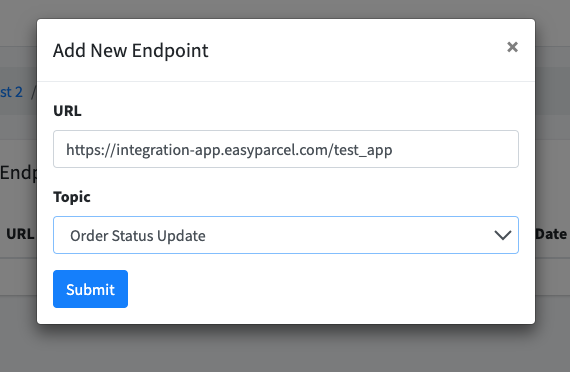
- Enter the URL and choose the Topic.
- Click Submit. EasyParcel checks your endpoint.
Open Webhook and click Add Endpoint (red boxes).
Enter the URL and choose a topic.
Topics
| Topic | Value in the payload | When it is sent |
|---|---|---|
| Shipment Status Update | shipment.status.update | A shipment status changes |
| Shipment AWB Update | shipment.awb.update | An AWB is created or updated |
| Tracking Status Update | shipment.tracking.update | Tracking is updated |
| Shipment Created | shipment.create | A new shipment is created |
| On-Demand Order Status Update | ondemand.status.update | An On-Demand order status changes |
Every payload has a topic field, so one endpoint can receive several topics.
Delivery and retries
- EasyParcel waits 3 seconds for your reply. Reply fast and do slow work afterwards.
- Only HTTP 200 counts as delivered. Any other code, a timeout or a connection error is a failure.
- A failed delivery is tried again up to 3 times, about 5, 10 and 20 minutes after the first try.
- The same event can arrive twice, and events can arrive out of order. Use the Easyparcel-Webhook-Id header to skip an event you already handled, and compare event_date to ignore older updates.
Check the signature
Every webhook is signed with your app's client secret, so you can check it really came from EasyParcel.
- Read the raw request body exactly as it arrived, before you parse it.
- Take t and v1 from the Easyparcel-Signature header (it looks like
t=...,v1=...). - Work out the HMAC-SHA256 of
t, a dot, and the raw body, using your client secret as the key. Write it in hex. - Compare it with v1 using a constant-time comparison. If they differ, reject the request.
- Reject the request if t is more than 5 minutes away from your own clock.
The Easyparcel-Client-Id header tells you which app the webhook belongs to, if one endpoint serves several apps.
What's next?
Still need help?
Our team is happy to help. ? Live Chat | ✉️ Contact Us