
Quick Summary
The dashboard is your home page. It shows your credit balance, today's pick-ups and drop-offs, your COD status and shortcuts to the pages you use most. Use the left menu to open any page, and the top bar to track parcels, see your cart and notifications, change the language and open your profile.
We'll Cover:
What the dashboard shows?
- Recently Used (1): shortcuts to pages you opened lately, such as Account Profile, Top Up and Manage Parcel
- Credit Balance (2): your Top Up Credit and Free Credit, with a View link
- Today Shipments (3): Pick Up Today and Drop Off Today, with Create a New Order
- COD Shipments (4): Pending for Delivery and Ready for Withdrawal, with View COD
- Announcement: news and tips from EasyParcel
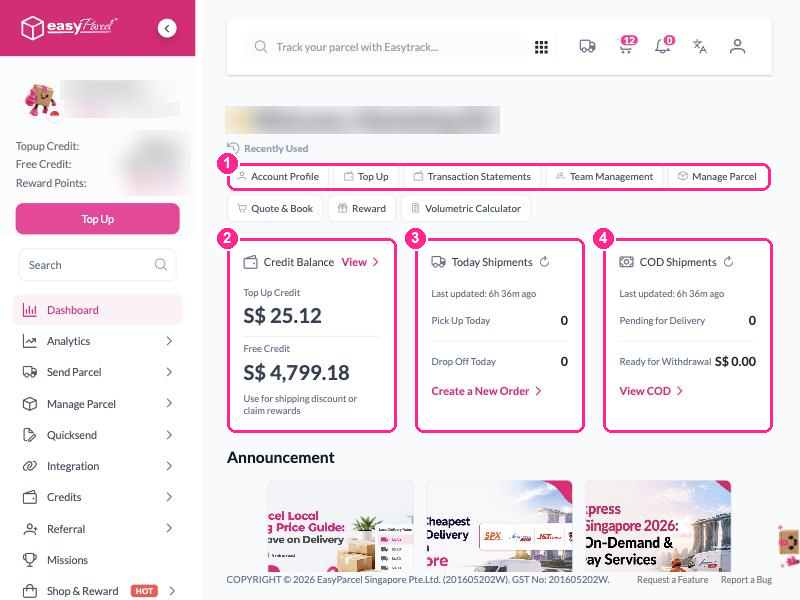
The top bar

- Track your parcel with EasyTrack – type a tracking number to check its status.
- Switch product – move between Send Parcel, WhatsApp Blaster, Email, AI Agent and Control Panel.
- Quote & Book – get a delivery quote and book from any page.
- Cart – parcels waiting for payment. The number shows how many.
- Notifications – your latest updates.
- Language – change the display language.
- Profile – view your user profile or log out.
The left menu
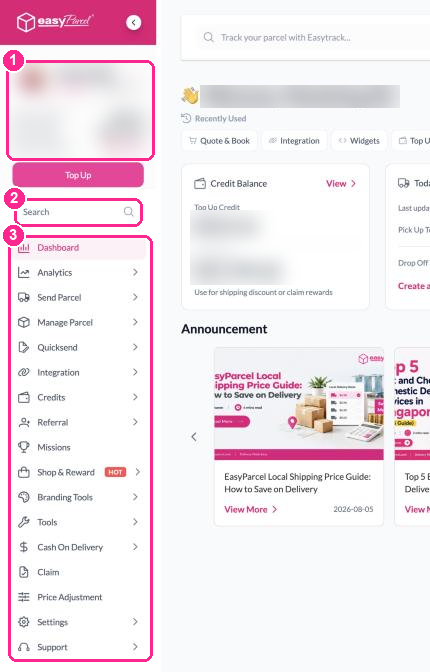
At the top of the left menu you will see your account name, your Topup Credit, Free Credit and Reward Points, plus a "Top Up" button. Below that, features are grouped by task:
- Dashboard and Analytics
- Send Parcel – Domestic, International, On-Demand and Bulk Upload
- Manage Parcel – All Parcels and On-demand Delivery
- Quicksend, Integration and Credits
- Referral, Missions and Shop & Reward
- Branding Tools, Tools and Cash On Delivery
- Claim, Price Adjustment, Settings and Support
Tip: Use the Search box at the top of the menu to jump straight to any feature.
Your account and credit (1), the menu Search box (2) and the menu groups (3).
The Dashboard page
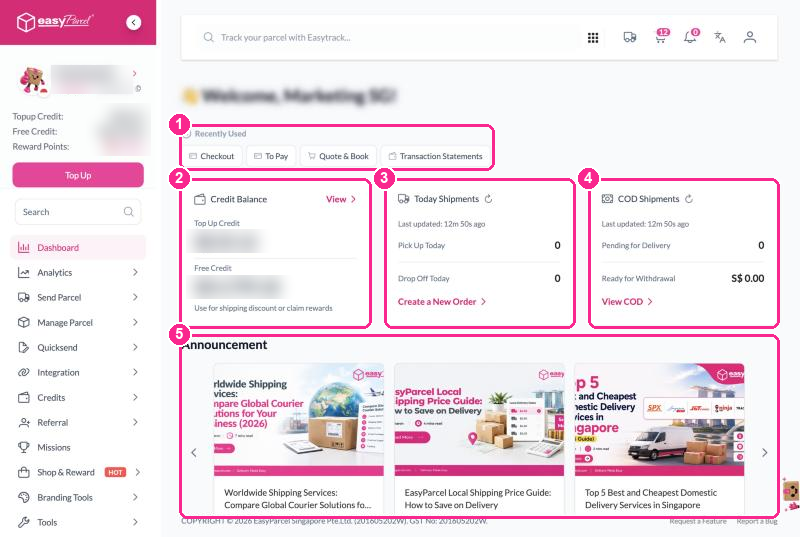
- Recently Used – shortcuts to the pages you opened last.
- Credit Balance – your Top Up Credit and Free Credit. Click "View" to see your transaction history.
- Today Shipments – parcels for pick up or drop off today. Click "Create a New Order" to start a booking.
- COD Shipments – COD parcels pending delivery and the amount ready for withdrawal. Click "View COD" for details.
- Announcement – the latest news, promotions and guides.
Note: Need help? Click EPPY, the EasyParcel assistant, at the bottom right of any page.
EPPY, your EasyParcel assistant
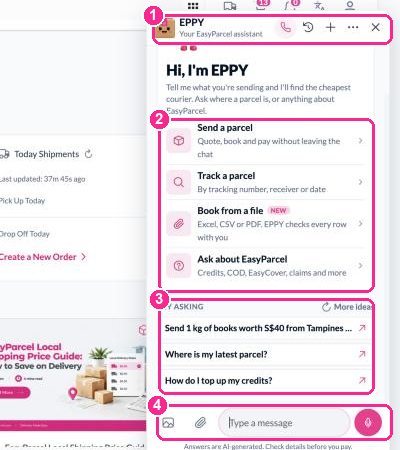
Need help fast? Click the EPPY button (1) at the bottom right of any page.
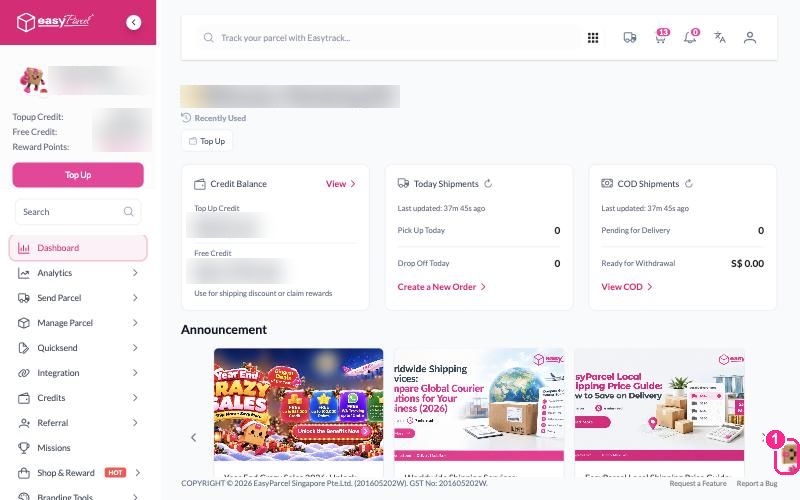
The EPPY panel opens on the right. You can:
- See who you are chatting with (1)
- Pick a quick action (2): Send a parcel (quote, book and pay in the chat), Track a parcel, Book from a file (Excel, CSV or PDF) or Ask about EasyParcel
- Tap a suggested question under Try asking (3)
- Type your own question, or attach a file, in the message box (4)
EPPY's answers are AI-generated, so check the details before you pay.
What's next?
Still need help?
Our team is happy to help. ? Live Chat | ✉️ Contact Us