
Quick Summary
To stop using your account for a while, switch it to Suspended in Settings > Account Profile, and switch it back to Active when you need it. To close it for good, contact our support team. Withdraw any COD money and use your credit first.
We'll Cover:
Where to find it?
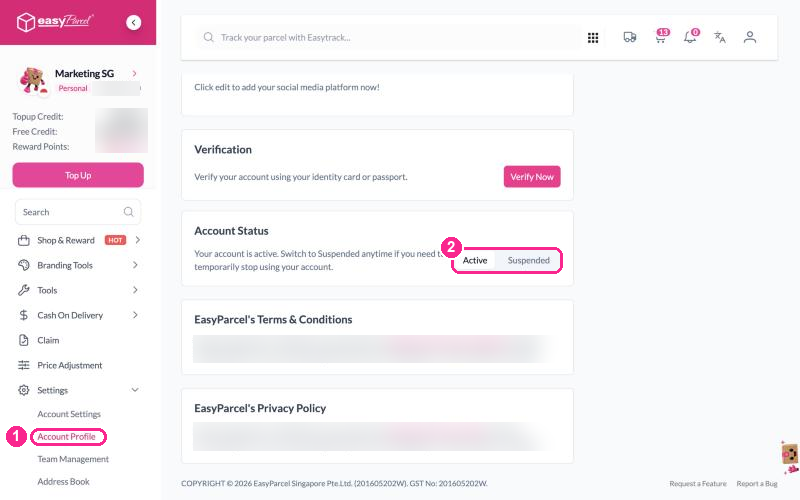
Open Settings > Account Profile and find Account Status. It says "Your account is active. Switch to Suspended anytime if you need to temporarily stop using your account."
In Settings > Account Profile (1), use the Active / Suspended (2) switch under Account Status.
Stop using it for a while
Switch your account to Suspended in Settings > Account Profile under Account Status. You can switch it back to Active later. See How do I suspend or reactivate my account?
In Settings > Account Profile (1), use the Active / Suspended (2) switch.
Close it for good
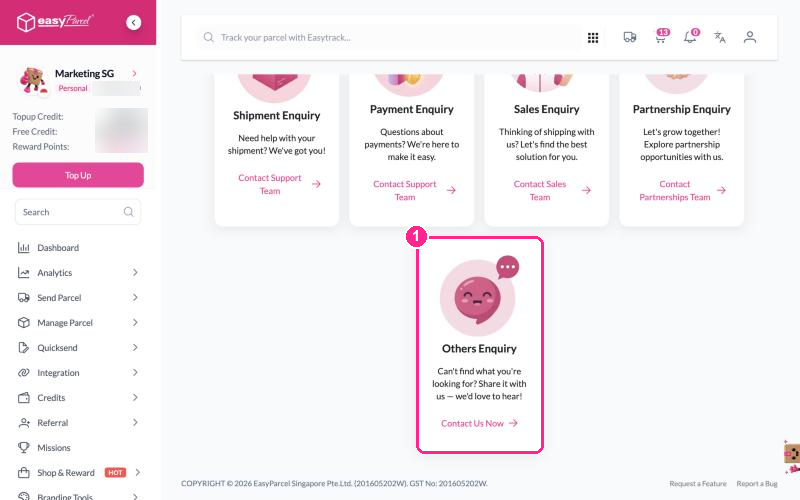
Contact our support team and ask to close your account.
Go to Contact Us and choose Others Enquiry (1).
Before you close it
- Make sure all parcels are delivered or cancelled
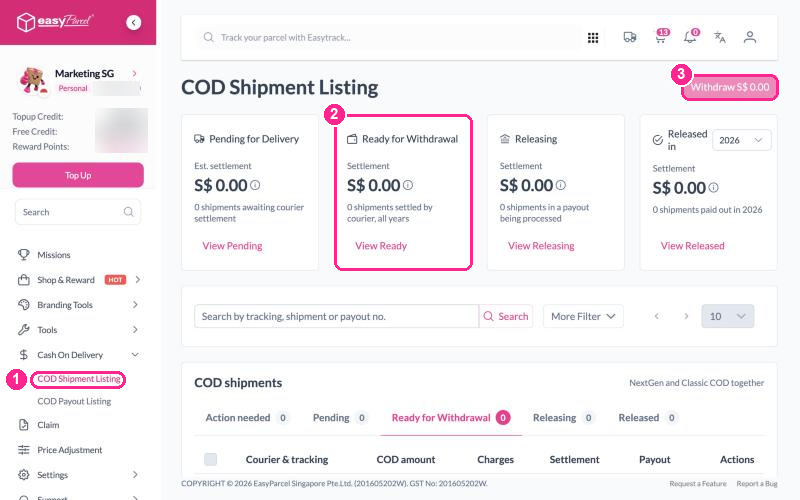
- Withdraw any COD money that is ready
- Download any invoices or statements you need
Go to Cash On Delivery > COD Shipment Listing (1). Withdraw any money in Ready for Withdrawal (2) with Withdraw (3).
What's next?
Still need help?
Our team is happy to help. ? Live Chat | ✉️ Contact Us