
Quick Summary
Account Settings is where you set your label size, privacy masking, branding, auto-save addresses and notifications. Open it from Settings > Account Settings.
We'll Cover:
What you can set?
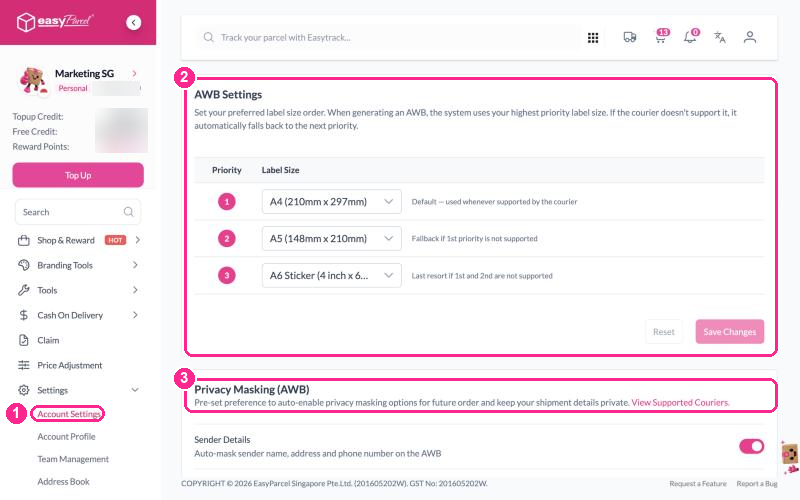
- AWB Settings: label size order (A4, A5, A6 sticker). See What is an AWB, and how do I print or download it?
- Privacy Masking (AWB): see What is privacy masking and how do I turn it on?
- AWB Branding and EasyTrack Branding: switch on automatically for new orders
- Auto-Save Addresses: save sender and receiver addresses to your address book on every booking
- Notification preferences: choose in-app, mobile app, desktop and email notifications
- Buyer tracking notifications: Email, SMS and WhatsApp for your receivers
Click Settings > Account Settings (1). The page starts with AWB Settings (2) and Privacy Masking (AWB) (3). Scroll down for AWB Branding, EasyTrack Branding, Auto-Save Addresses and Notification preferences.
Still need help?
Our team is happy to help. ? Live Chat | ✉️ Contact Us