
Quick Summary
After you click Quote, each row on the results page is one courier service. Check the courier and service type, the pick-up punctuality, the delivery time and the price, then click Book on the one you want.
We'll Cover:
What each column means?
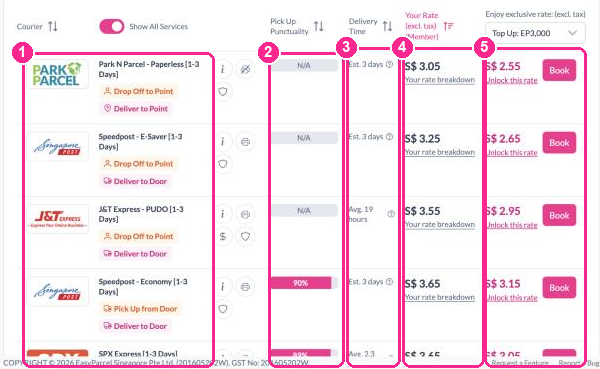
- Courier (1) – the courier, its service name and how your parcel is handled (for example, Pick Up from Door or Drop Off to Point)
- Pick Up Punctuality (2) – how often the courier collects on time. "N/A" means there is no pick-up score for that service
- Delivery Time (3) – the estimated time to deliver your parcel
- Your Rate (4) – the price you pay before tax
- Exclusive rate and Book (5) – see the lower rate you can unlock, then click Book to continue
How to see the rate breakdown?
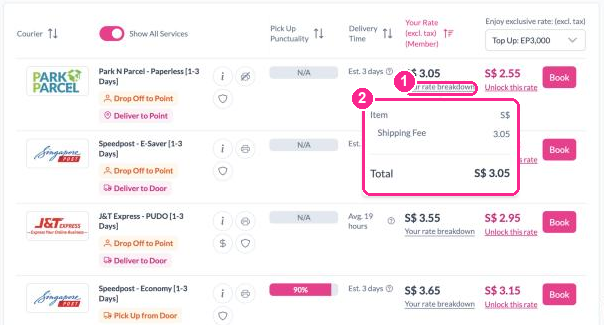
Click Your rate breakdown (1) under any price. A small box (2) shows what the price is made of, such as the shipping fee and the total.
Compact and Advanced views
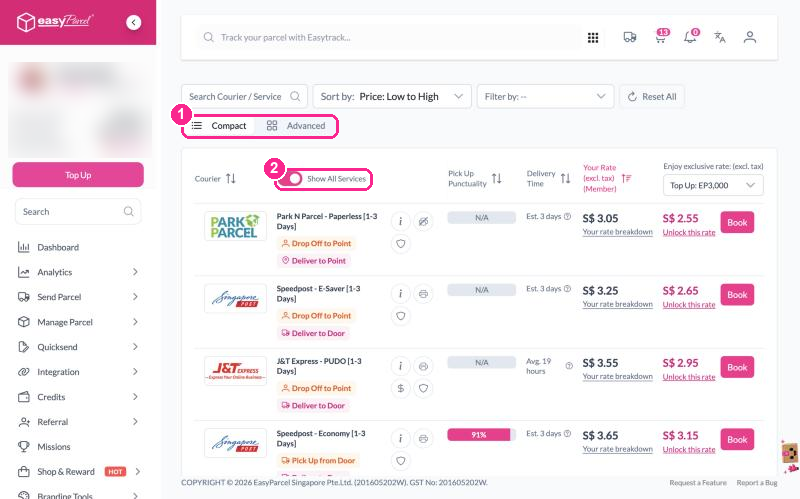
Use the Compact and Advanced buttons above the list to change how much detail each row shows. Turn on Show All Services to see every service available for your parcel.
Note: Prices are before tax. The final amount is shown at checkout before you pay.
The Compact and Advanced buttons (1) and the Show All Services switch (2).
What's next?
Still need help?
Our team is happy to help. ? Live Chat | ✉️ Contact Us