
Quick Summary
Use the bar above the results to search a courier, sort by price, speed or punctuality, and filter by service type. Then compare the rows and click Book on the courier that suits you.
We'll Cover:
Search and sort
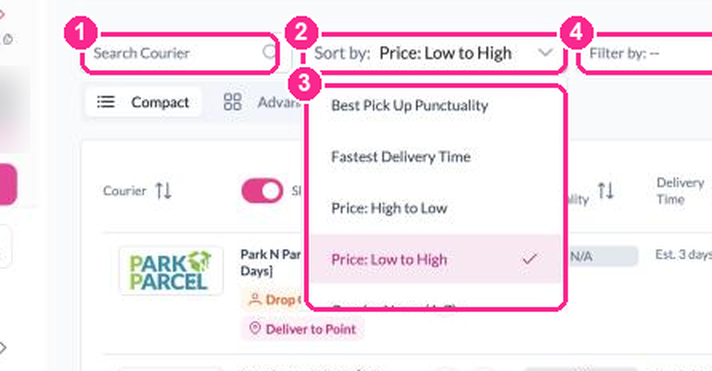
Type a name in Search Courier (1) to find one courier. Open Sort by (2) and choose an option (3):
- Best Pick Up Punctuality
- Fastest Delivery Time
- Price: High to Low
- Price: Low to High
- Courier Name (A-Z)
Click Reset All (5) to clear your search, sorting and filters. You can also open Filter by (4) to narrow the list.
Filter by service type
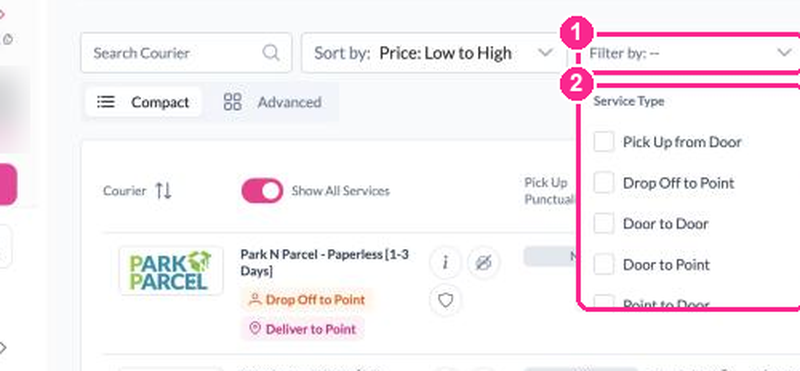
Open Filter by (1) and tick one or more Service Types (2), such as Pick Up from Door, Drop Off to Point, Door to Door, Door to Point or Point to Point.
What to compare?
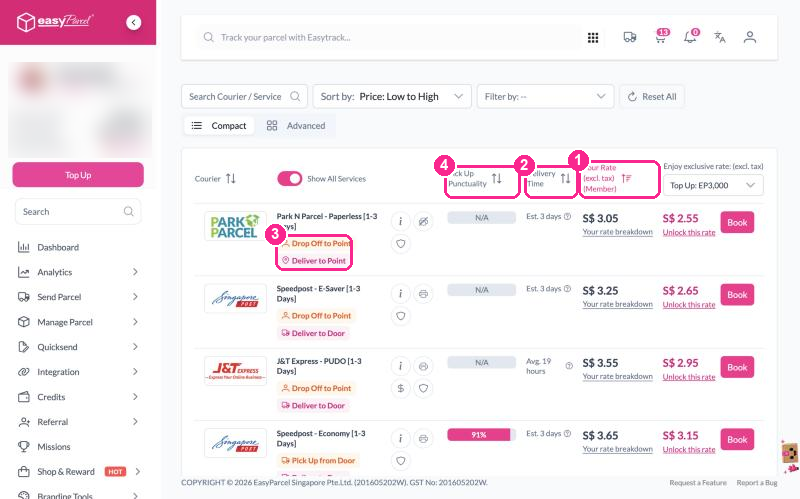
- Price – the lowest price is not always the best fit
- Delivery time – choose faster if your receiver is waiting
- Service type – pick-up from your door is easier; drop-off means you take the parcel to a point
- Pick-up punctuality – a higher percentage means more on-time collection
On the quote results: price (1), delivery time (2), service type (3) and pick-up punctuality (4).
What's next?
Still need help?
Our team is happy to help. ? Live Chat | ✉️ Contact Us