
Quick Summary
Enter your parcel's real weight and size when you get a quote. Couriers measure your parcel when they collect it, and if it is heavier or larger than declared, a price adjustment may be charged. EasyParcel checks your entries and suggests fixes if they look wrong.
We'll Cover:
Why accurate weight and size matter?
Parcel price is based on the higher of the actual weight and the volumetric weight (calculated from length × width × height). If your declared details are lower than the real ones, the courier's final charge can be higher than your quote.
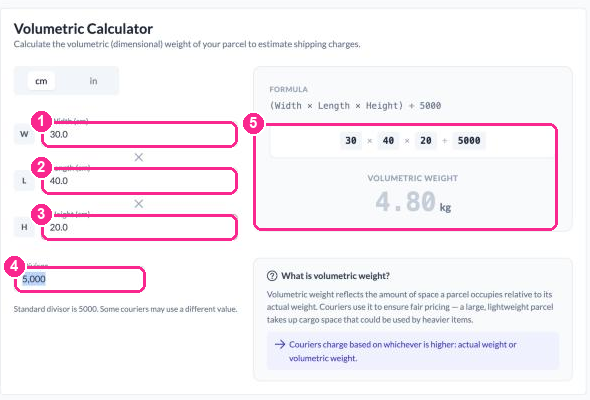
Check the volumetric weight in Tools > Volumetric Calculator: enter the Width (1), Length (2) and Height (3), check the Divisor (4) and read the Volumetric Weight (5).
Smart Dimensions suggestions
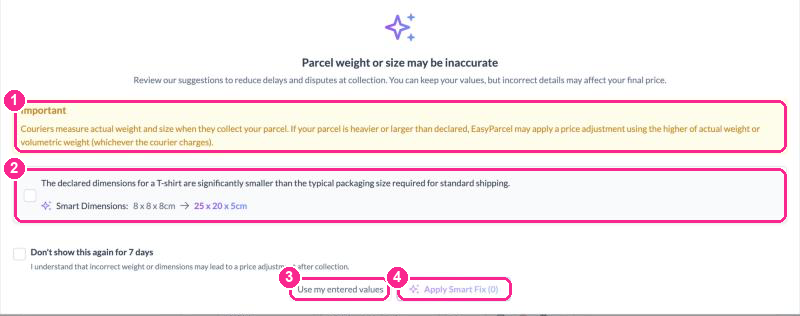
If the size you entered looks too small for the item, a "Parcel weight or size may be inaccurate" message appears. It shows an important reminder (1) and a suggested size (2). Then choose:
- Use my entered values (3) – keep what you typed
- Apply Smart Fix (4) – tick the suggestion first, then use the suggested size
Tips for measuring
- Weigh and measure the parcel after it is packed
- Measure the longest side for length, then width and height
- Round up to the next whole number
- Use the Volumetric Calculator under Tools in the left menu
Note: If you keep your own values, a price adjustment may apply after collection.
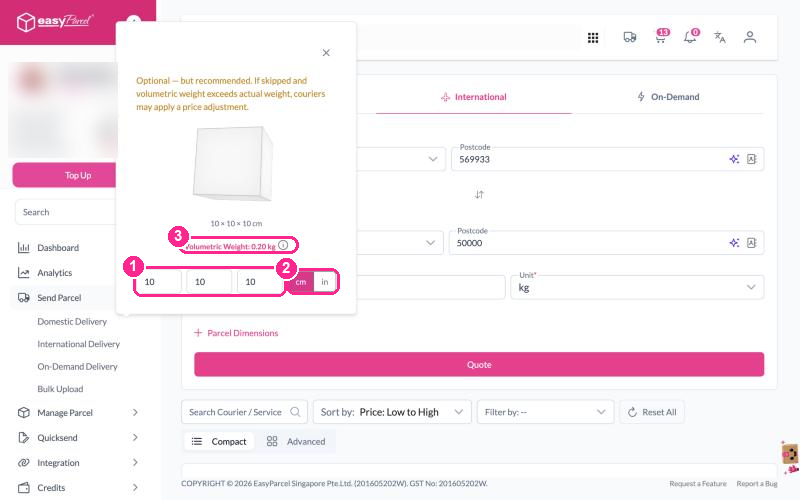
Enter your measured size under + Parcel Dimensions (1) and choose the unit (2). Check the Volumetric Weight (3).
What's next?
Still need help?
Our team is happy to help. ? Live Chat | ✉️ Contact Us